How to Use Notes in a Video Interview Without It Showing
Updated 2026-10-03 · 5 min read
Short answer: Notes are fine in most video interviews; career advisers like Indeed say so. Keep them short (your stories, key numbers and your questions), put them right under your camera so your eyes don't wander, and organize them by question so you can find the right one fast. Never use notes in proctored tests or anywhere aids are banned, and never use a tool that writes answers for you.
A video interview gives you one advantage an office interview doesn't: the interviewer can't see your desk. Used well, that means your best stories and numbers are a glance away. Used badly, it means eyes flicking down, long pauses while you scroll, and answers that sound read. This guide is about using it well.
A disclosure: I make GlideRail, a Mac notes app whose windows are invisible to screen sharing. It appears in the setup section. Everything before that works with paper or any notes app.
Are notes allowed in a video interview?
For a normal interview, yes. Indeed's interview advice says plainly that "using notes is acceptable and can be quite helpful" in a virtual interview, and university career centers give the same advice: Duke's suggests keeping materials on hand for reference but out of view of the camera.
Two situations are different:
- Proctored assessments. Coding tests and timed assessments often run in a monitored mode with a list of banned actions. HackerRank's proctor mode, for example, prohibits switching tabs and using external tools. Follow those rules. Don't open notes, invisible or not.
- AI that answers for you. Tools that listen to the question and write an answer are a different thing from notes, and many employers treat them as disqualifying. The full line between preparation and cheating is in is it cheating to use notes in a Zoom interview?.
If an interviewer asks whether you have notes, say yes. "I wrote down a few examples so I don't forget them" is a fine answer.
What to put on your notes
Notes for an interview are prompts, not a script. If you read full sentences, you'll sound like you're reading. Write only what you'd hate to forget:
- Your 30-second introduction. The one part worth knowing almost word for word.
- Four to six stories, as headlines. One line each: the situation and the result with a number. "Churn project: cut cancellations 18% in a quarter." Enough to start the story; you tell the rest.
- The numbers. Team size, budget, growth, dates. These are what people blank on.
- Your answers to the hard questions. Why you're leaving, the gap on your résumé, salary expectations. Three or four words each.
- Your questions for them. Two or three, specific to the role.
Organize them by question, not by story
Interviews jump around. If your notes are one long page, you'll scroll looking for the right story while the interviewer waits. Instead, give each likely question its own section, named the way an interviewer would ask it:
- Tell me about yourself
- A time you failed
- A conflict with a coworker
- Why this company
- Salary expectations
Then you don't search; you go to the section. Many stories answer several questions, so repeat a headline under each one it fits.
Where to put them
Right under your camera, as narrow as you can make them. The farther the words sit from the lens, the more your eyes travel, and a glance down at the bottom of the screen is the look everyone recognizes as reading. Paper taped just below the webcam works. On a Mac, a floating notes window parked under the camera works better, because it can hold more and change during the call.
If they ask you to share your screen
Portfolio walkthroughs, case studies and some technical interviews ask you to share your screen. Then notes on your screen become a problem: share your entire screen and the interviewer sees everything on it. Two ways to handle it:
- Share one window. Zoom, Google Meet and Microsoft Teams all let you share a single window, such as your portfolio or a document. Notes elsewhere stay private.
- Use notes that stay out of screen shares, if you need to move between apps. GlideRail's windows are invisible to screen capture (a Pro feature). It's still your own prep, and the proctored-test rule still applies: don't use it where aids are banned.
Set up interview notes on a Mac
- Write one section per question. In GlideRail, type
#and the question as a heading ("Tell me about yourself"), press Return, and add your headline notes under it. The notes app is free. - Put the window right under your camera. Make it narrow and use a large font, so a glance is enough.
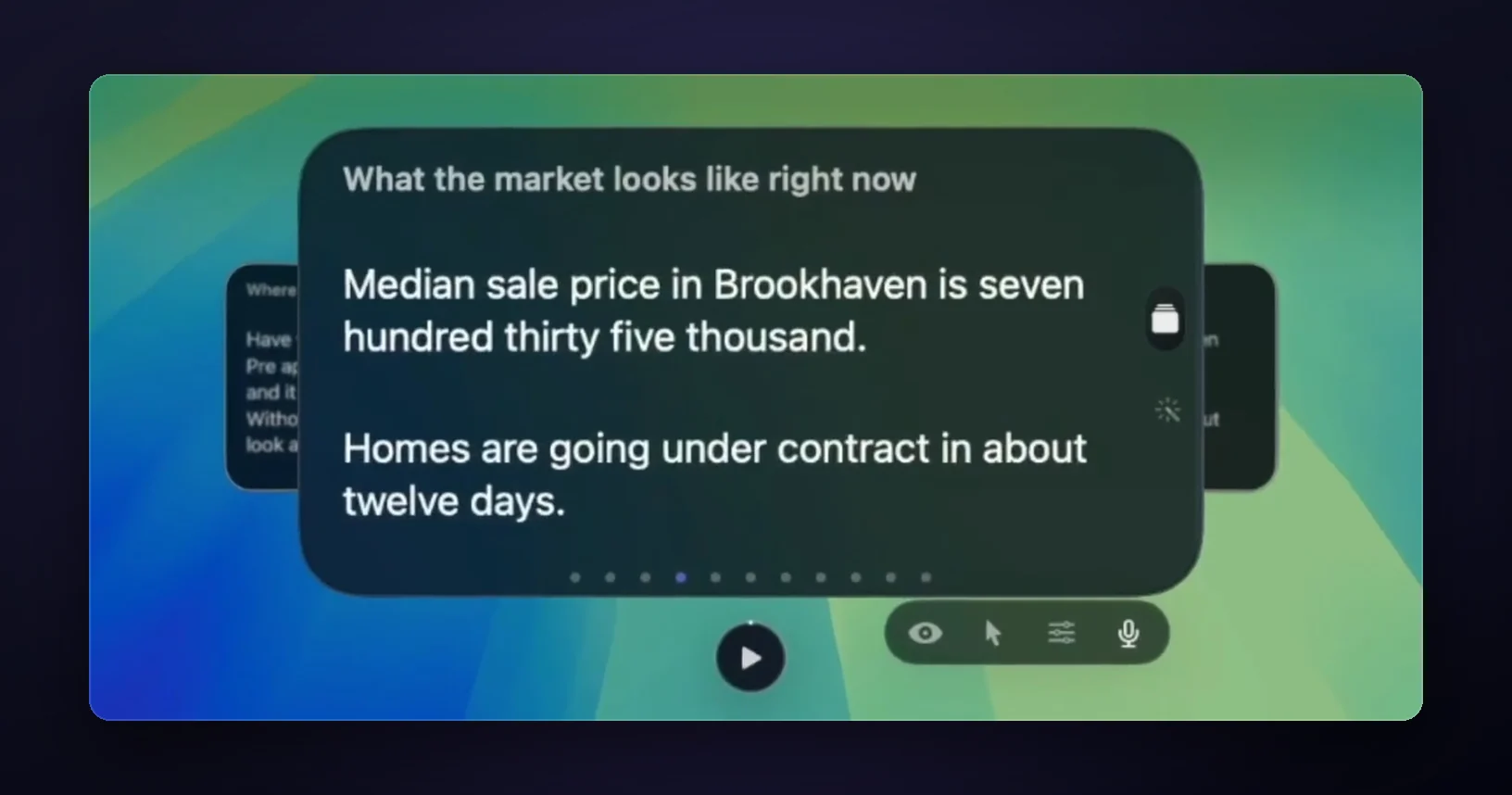
- Turn on Cue Mode. Each section becomes a card you can jump to with ⌘1 to ⌘9 or a swipe, instead of scrolling. Cue Mode is a Pro feature, included in the 7-day free trial.
- Turn on invisibility if you might share your screen. Click the eye in the note window, and your notes stay out of the share. On Zoom, set the screen capture mode to "Advanced capture with window filtering" first (the Zoom guide has the steps).
- Do a practice run with a friend. Ask them where you seemed to be looking. If they noticed you reading, move the window closer to the camera and cut words.
On an Apple Silicon Mac, Live Rail (Pro) can make step 3 even quicker. It listens to the call on your Mac, and when the interviewer asks a question that matches one of your headings, it offers that card. One click jumps to it. It brings up only the notes you wrote; it doesn't write or suggest answers, and no audio is saved or sent anywhere.
Mistakes that give notes away
- Reading full sentences. Your voice changes when you read. Headlines force you to speak.
- Notes at the bottom of the screen. Every glance looks like you're checking something.
- Scrolling during an answer. The pause and the eye movement are obvious. One card per question fixes it.
- Notes you didn't write. If someone else's words are on the screen, you'll stumble on them. Write them in your own voice.
FAQ
Can interviewers tell when you're reading notes?
They can tell when your eyes move away from the camera or your voice turns flat. They can't see the notes themselves. Keep the notes right under the lens, write headlines instead of sentences, and your glances look like thinking.
Is it OK to use notes in a Zoom interview?
Yes, for a normal interview. Career advisers like Indeed say notes are acceptable in virtual interviews. The exceptions are proctored assessments and any interview where you're told not to use materials. Then don't.
What should I write on interview notes?
Your 30-second introduction, four to six stories as one-line headlines with a number each, the key figures from your work, short answers to the hard questions, and two or three questions for them. Organize them by the question you expect, not in one long list.
Can I use GlideRail in a coding test?
Not in a proctored or monitored assessment. Those ban outside tools, and some testing apps block other apps outright; HackerRank's desktop app mode, for example, closes other programs during the test. Use notes only where they're allowed.
Does GlideRail write answers for me?
No. GlideRail has no generative AI. Live Rail only brings up a card you wrote when the interviewer's words match its heading. Every word on screen is yours.
Written by Takumi Mitchell, maker of GlideRail. Last updated October 3, 2026.