Talking Points on Sales Calls: 7 Mac Tools Compared (2026)
Updated 2026-11-14 · 7 min read · Competitor facts last checked 2026-11-14
Short answer: I created GlideRail, so it's listed last. Of the other six, ShowNotes, Spiky's Whisper app, Dialpad Live Coach, Revenue.io Moments and Nooks show cards that you or your team wrote ahead of time, and Cluely writes answers live with AI. ShowNotes is $19 once and you flip the cards yourself; Spiky (Premium) brings a card up when its topic comes up; Dialpad, Revenue.io and Nooks are sold to sales teams. GlideRail is a conversation rail for your Mac: your own prep on cards by your camera, offered when the buyer says the words on one.
This page is for people who sell on their own video calls from a Mac: founders, agency owners, consultants and salespeople. You've prepared answers for price and scope, and you want the right one in view when the buyer brings it up.
First, the bias: I created GlideRail
GlideRail is on this list, so it gets its own section after the others, judged on the same points. Every fact about another tool comes from that tool's own pages, which I read on November 14, 2026, and each link below is the page I used. I haven't tested these tools hands-on. Where a page doesn't say something, I write "not stated".
What to check
- Who writes the words. Some tools show only what you or your team wrote before the call. Others write answers with AI while the call is on.
- How a card comes up. By your hand, or when the tool picks up a cue in the call.
- Which calls it works in. Zoom, Google Meet and Teams, or only the vendor's own dialer or meeting app.
- Whether the buyer can see it when you share your screen.
- What one person pays.
Side by side
| Who writes the words | How a card comes up | Hidden when you share | Price | |
|---|---|---|---|---|
| ShowNotes | You | Hotkeys | Yes, in the apps it lists | $19 once |
| Spiky Whisper | Your admin | Its topic comes up in the transcript | Not stated | Battlecards on Premium, $40 or $49 a user a month |
| Cluely | AI, during the call | You ask | On its $149.99 plan | Limited free plan; Pro $19.99 a month |
| Dialpad Live Coach | Your team | A cue in a Dialpad call | Not stated | From $59 a user (Sell Advanced) |
| Revenue.io Moments | Your team | A configured cue | Not stated | Not public |
| Nooks | Your team | A trigger word from the prospect | Not stated | Not public |
| GlideRail | You | The words on your card, then your click | With Pro | Free version; Pro (cues, listening, hiding) $19.99 a month |
The tools
ShowNotes
ShowNotes calls itself invisible cue cards for Mac. You write cards and flip through them with hotkeys. Its page lists it as hidden in Google Meet, Webex, Slack huddles (screen-share mode), Teams (window share), Loom, QuickTime and OBS, and in Zoom on 6.16 and older; newer Zoom versions need "Advanced capture with window filtering". It says it stays visible in FaceTime. It doesn't listen to the call: the page says it makes zero network requests apart from optional update checks, and lists voice-triggered card advance as a future version. The pricing page says $19 one-time with a 14-day trial, and it needs macOS 13 or later.
Pick it if you want your own cards hidden from a screen share for a one-time price, and you're happy to flip them yourself.
Spiky Whisper
Spiky's Whisper app runs on macOS 12 or later and Windows 10 or later, with Zoom, Teams, Meet and Slack, and says "No bot joins your calls." Its battlecards are written ahead of time, and Whisper puts the matching card up when its topic comes up in the live transcript. The pricing page lists battlecards on Premium only, at $40 or $49 a user a month (it doesn't say which is the monthly price), and a free plan with 3 meetings per user. Spiky also records calls, coaches on them and updates a CRM, as the GlideRail vs Spiky page sets out point by point.
Pick it if you want live cards plus recordings, coaching and CRM updates, or you need Windows.
Cluely
Cluely's homepage says it listens in real time and gives instant answers when you press Cmd+Enter, about your screen or the conversation, and names Zoom, Google Meet, Teams, Webex and Slack. Those answers are written by AI during the call rather than taken from your prep. The download page lists macOS 10.15 or later on Apple Silicon or Intel, and Windows 11. The pricing page lists a free Starter plan with limited AI responses, Pro at $19.99 a month and Pro + Undetectability at $149.99 a month. The homepage calls Cluely invisible to screen share, and the pricing page puts that line on the $149.99 plan only.
Pick it if you want answers written live for questions you didn't prepare for.
Dialpad Live Coach
Dialpad's Live Coach cards show guidance during a call. Its help center says you need a Dialpad Support or Sell plan to use them in Dialpad Meetings, in external meetings only; the pages I read don't mention Zoom or Google Meet. On the pricing page, Live Coach is listed from Sell Advanced at $59 a user a month, and on higher Sell and Support plans; the page doesn't say whether prices are billed monthly or yearly. Dialpad's Meetings app runs on Mac and Windows.
Pick it if your team already calls through Dialpad.
Revenue.io Moments
Moments listens for cues your team configured in a live conversation and brings up the guidance your team prepared. It lists the RingDNA dialer, Zoom, Teams and Google Meet, and says availability depends on connected channels and configuration. No price is public.
Pick it if you run a sales team that already uses Revenue.io.
Nooks
Nooks's help center says live battlecards appear when it detects a trigger word or phrase in the prospect's speech, inside its dialer. They need an AI Coaching Assistant seat and two-way call recording, and they don't work with rep-only recording. The pricing page asks you to get in touch for a quote.
Pick it if your team does outbound calling in Nooks's dialer.
GlideRail, on the same points
GlideRail is a conversation rail for your Mac: your prep sits on cards by your camera, and the right one is offered as the call turns. It never writes text for you, so every word on screen is one you wrote.
Cue Mode (Pro) turns your prep into cards you jump between in any order. Live Rail (Pro, Apple Silicon) recognizes speech on your Mac and listens for the words in your card headings and the words only that card uses, then offers that card in a small chip. One click, or ⌘Return, puts it up, and it never moves on its own.
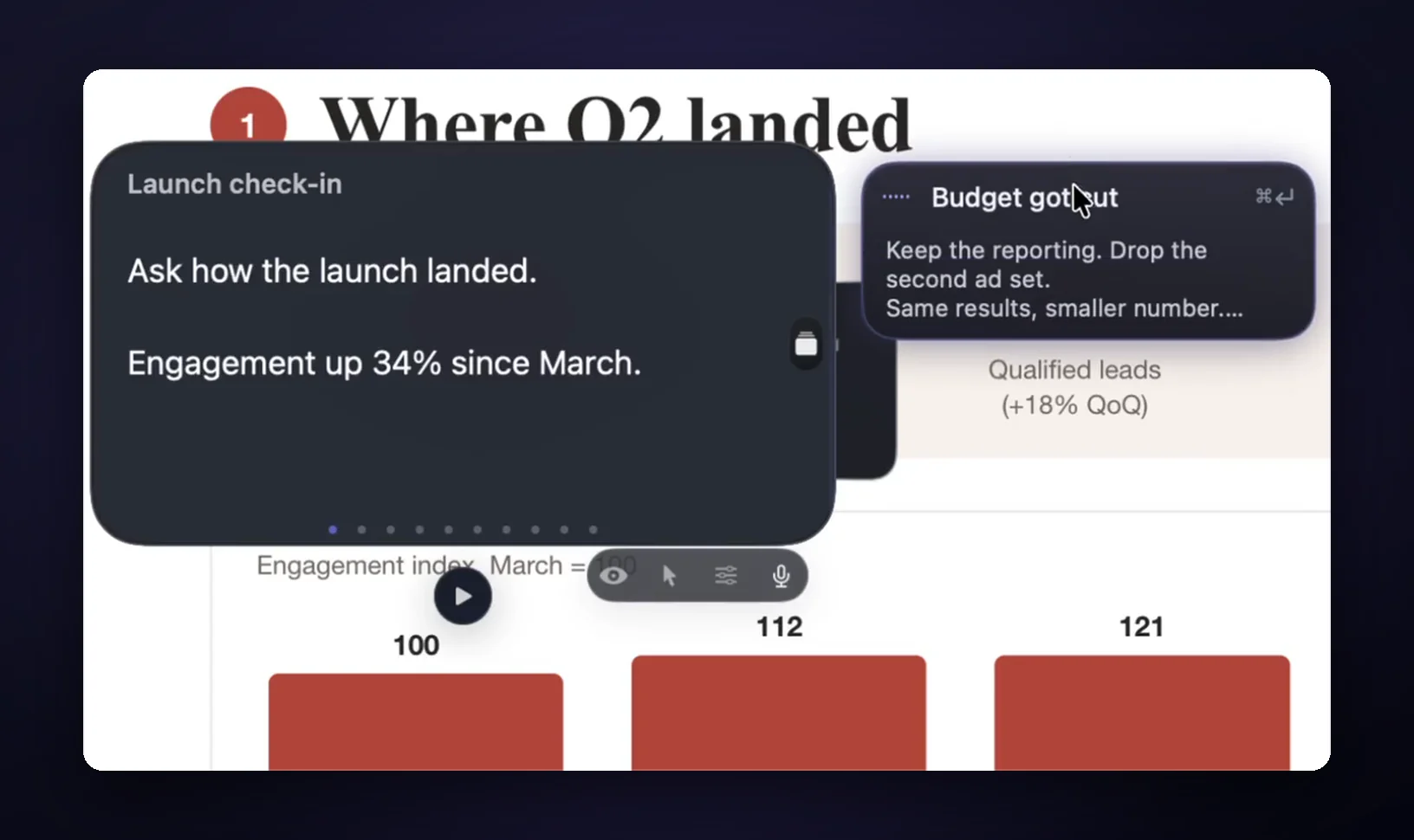
Say you wrote a card headed "Budget got cut". Halfway through your demo the buyer says their budget got cut this quarter, the chip offers that card, and your own answer is on screen. It matches the words on your cards, so "we're out of money" wouldn't bring up that card. Write cards in the words your buyers use.
The call audio stays on your Mac and is never saved or sent. There's no account and no bot. With Pro, its windows stay out of Zoom, Google Meet, Teams, Loom, OBS and QuickTime when invisibility is on; in Zoom that takes "Advanced capture with window filtering", as the Zoom guide shows. A phone pointed at your monitor still sees everything.
Live Rail, Cue Mode and hiding need Pro, at $19.99 a month or $99 a year, and the free version shows in screen shares. It's Mac only, needs macOS 14 or later, and Live Rail needs Apple Silicon. A question you never prepared for gets nothing from it, and it doesn't record, coach or take notes.
Pick it if you're the one on the call, on a Mac, and you want your own prep to come up when the buyer turns the conversation, with nothing recorded. It's free to download, and every download comes with 7 days of Pro, no card needed. The sales call guide shows how to set up cards for a call.
FAQ
Which tools show talking points during a Zoom sales call?
ShowNotes, Spiky Whisper, Cluely, Revenue.io Moments and GlideRail name Zoom on their pages. Dialpad Live Coach is described for Dialpad Meetings, and Nooks's battlecards for its own dialer.
Which ones bring up a card when the tool picks up a cue?
Spiky (Premium) puts up a card when its topic comes up in the transcript, Nooks when the prospect says a trigger word, and Revenue.io Moments and Dialpad Live Coach on cues your team configures. GlideRail's Live Rail offers your card in a chip when it hears the words on it, and waits for your click. ShowNotes doesn't listen, so you flip cards yourself. Cluely answers when you ask.
Which ones can the buyer see when I share my screen?
ShowNotes and GlideRail (Pro) say they're hidden from screen shares in the apps they list, and Cluely's pricing page says so for its Pro + Undetectability plan. The other pages I read don't say.
Is there a free option?
Cluely has a limited free Starter plan, and Spiky a free plan with 3 meetings per user (battlecards are on Premium). ShowNotes has a 14-day trial. GlideRail has a free version, and Pro is free for 7 days with each download.
More comparisons are on the comparisons page.
Written by Takumi, who created GlideRail. Rival facts read on their own pages on November 14, 2026.