Can Zoom See Your Other Windows? What's Actually Visible (2026)
Published 2026-10-01 · 6 min read
No. People on a Zoom call see your camera feed, hear your mic, and see whatever you explicitly pick after clicking the green Share button, and nothing else. Zoom doesn't broadcast your desktop, list your open apps, or flag your other windows to the host. The one real exposure is self-inflicted: choosing "Desktop" in the share sheet while your notes sit on it.
One disclosure up front: I make GlideRail, a Mac notes app whose windows are invisible to screen capture. It comes up once, near the end. The rest of this is just how Zoom works.
What do Zoom participants actually see?
Zoom participants see exactly four things from you on a normal call: your camera video, your microphone audio, your name and profile details, and anything you deliberately send (chat messages, reactions, a shared screen). Zoom is a conferencing app, not a remote-desktop tool; it has no ambient view of your machine.
Your browser tabs, your notes app, your unread badge count, the recruiter comparison spreadsheet you have open: none of it is transmitted. The host's screen has no secret panel showing yours.
The scale makes the question worth settling. Zoom itself reported averaging 300 million daily meeting participants by April 2020 (up from a 10 million peak the December before), and none of those calls broadcast anyone's desktop.
Window share vs. full-screen share
A window share and a full-screen share expose completely different amounts of your Mac. Scope is everything. Zoom's share options run from a single window to your whole desktop, and your notes stay private exactly as long as they live outside what you picked.
Share a window and Zoom transmits that window's contents only. Your other windows aren't captured even when they physically overlap the shared one; participants just keep seeing the shared window. Zoom even keeps its own windows out of the share by default, so your chat panel and participant list stay yours.
Share your entire screen and the deal flips: everything visible on that display is transmitted. Notifications as they arrive. Browser tab titles. File names on your desktop. Your notes, if they're up. Nothing "else" is visible to Zoom. You just made everything else visible yourself.
Can the Zoom host see your screen?
No. A Zoom host cannot see your screen, your open apps, or your other windows. Hosts get admin powers over the meeting (mute, remove, lock, record), not X-ray powers over your computer. And the one feature that ever came close to attention-monitoring is dead.
Until 2020, Zoom had an attendee attention tracker that showed hosts an indicator when a participant's Zoom window wasn't in focus during a share. Zoom removed it on April 2, 2020, citing its "commitment to the security and privacy of our customers." Nothing replaced it. As of August 2026, a host cannot tell whether you're looking at Zoom, your notes, or a browser window; Zoom simply doesn't report it.
What does a Zoom recording capture?
A Zoom recording captures meeting content only, the same rule as live viewing. Zoom's recording layouts are built from active speaker video, gallery view, and the shared screen. There's no layout that records a participant's desktop, because that feed never exists.
The flip side deserves respect. A recording is the live call made permanent. If your notes were visible in a share for three seconds, they're in the file: pausable, zoomable, and forwardable to people who weren't on the call.
The Mac screen-recording permission isn't a wiretap
The first time you share on a Mac, Zoom makes you grant screen-recording permission in System Settings → Privacy & Security. The prompt alarms people, reasonably. But the permission is a macOS gate, not a live feed: it's what allows the Share button to function at all, and what other people see still starts only when you click Share and pick a target. You can revoke it in System Settings whenever you like.
The real risk is your own full-screen share
The real exposure on Zoom is your own full-screen share: the day you share your whole screen, Zoom transmits every window on it at once, notes included. That day comes for anyone who runs demos, walks through multiple apps, or answers "can you show me?" honestly.
You have two ways out. The first is discipline: share a single window and keep everything private by scope; here's how to share your screen without showing your notes on Zoom, Meet, and Teams. It's free and it works, right up until you need a second app mid-call.
The second is the paid one: make the notes themselves invisible to capture. GlideRail's windows are excluded from screen capture at the macOS layer, so you can share your entire desktop and the call sees every app except your notes. Same result in Meet, Teams, and recordings via Loom, OBS, or QuickTime (the details are in notes invisible to screen recording). Park the note under your webcam and your eyes stay near the lens while you read; the placement tricks are in how to see your notes during a Zoom call.
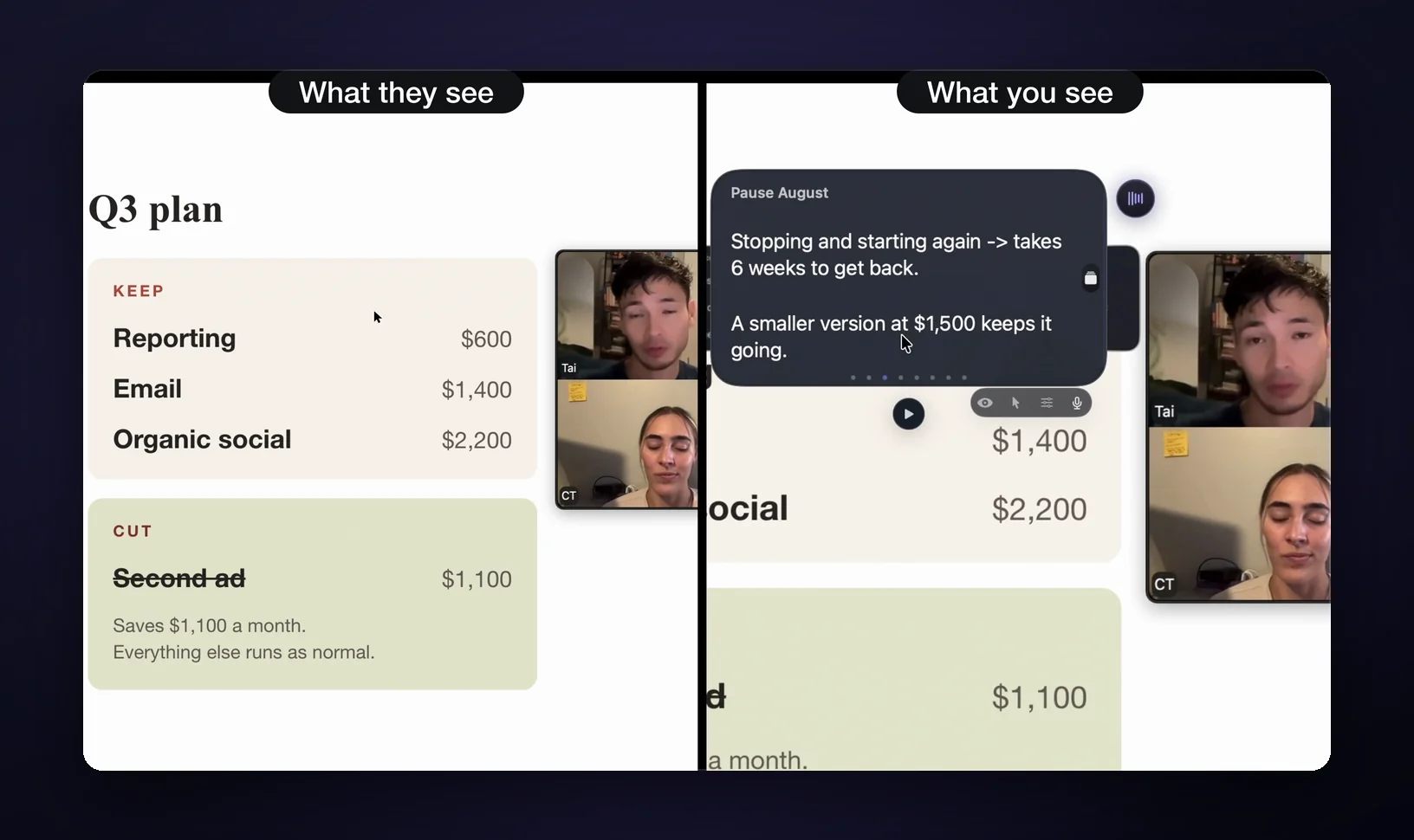
Straight terms: invisibility is a Pro feature; the free tier is a real notes app with visible windows. It defeats screen capture, not physics. A phone camera pointed at your display, or anyone standing behind you, sees the notes fine. And if you never share your screen and your calls aren't recorded, you don't need it; a Stickies note parked off-camera already does the job.
FAQ
Can Zoom see your browser tabs?
No. Your browser is only transmitted when you share it. And Zoom has no tab-level share, so you're sharing the whole browser window or the whole screen. Either one shows the tab strip, and the strip shows every tab's title. Move sensitive tabs to a separate window you never share.
Can my employer watch my screen through Zoom?
Not through Zoom: there's no host-side or admin-side view of your desktop during a meeting. A company-managed laptop can run separate monitoring software with rights Zoom doesn't have, but that's device management, not Zoom. On a work machine, assume the machine's rules, not the app's.
Does Zoom tell anyone when you take a screenshot?
No. As of August 2026, Zoom has no screenshot detection or notification in meetings; nothing pops up on the other side when you capture the screen. Recording is different: starting a Zoom recording announces itself to participants. Etiquette for screenshots is on you, not enforced by the software.
Can the host force my screen to share?
No. Sharing always starts from your click on your machine. There's no host control that turns your share on remotely. What hosts can do is the reverse: restrict who is allowed to share. If a host asks you to share, it's a request you can decline.
Is having notes open during a Zoom interview cheating?
Your own preparation in your own words is exactly that: preparation. Interviewers object to the other thing: AI tools feeding you live answers you didn't write. Where the line actually sits, and how interviewers see it, is worth reading in full: is it cheating to use notes in a Zoom interview.
If the full-screen share is the moment your notes keep dying, download GlideRail free. The notes app is free forever, and the 7-day free Pro trial covers Pro features like invisibility. Install it now, and spend the trial on a call that actually matters. If it doesn't earn its place, delete it and you're out nothing.
Written by Takumi Mitchell, maker of GlideRail. Last updated October 1, 2026.