Best Invisible Notes Apps for Mac in 2026 (Hidden from Screen Share)
Published 2026-10-08 · 9 min read · Competitor facts last checked 2026-10-08
An invisible notes app for Mac keeps a window on your screen that screen shares and recordings can't see: Zoom, Meet, Teams, Loom, and OBS capture everything except your notes. In 2026 the field includes GlideRail (a macOS notes app whose windows are invisible to screen capture) plus ShowNotes, CueNotch, Tellie, Moody, and free options like NotchPrompter. Most are teleprompter strips. One is a full notes app. Here's the whole list, with every claim checked on the vendor's own site.
Full disclosure: I make GlideRail, one of the apps below. The verification is real anyway. Every price and invisibility claim in this post comes from the app's own site, App Store listing, or repo, checked October 8, 2026.
They all hide the same way
Every invisible notes app on this list hides the same way. There's no secret sauce, and any app that implies otherwise is marketing at you. macOS lets a developer mark a window as excluded from capture; the AppKit setting is called NSWindow.SharingType. Capture software reads the screen through macOS APIs, so an excluded window simply never enters the stream. Your physical display shows it; the recording doesn't.
That's why this works even when you share your entire desktop in Zoom, which otherwise shows everything on the display (on Zoom, with its screen capture mode set to "Advanced capture with window filtering", under Settings, Share Screen, Advanced). The exclusion happens at the OS level, before the call ever sees a pixel. Same story for Meet, Teams, Loom, OBS, and QuickTime.
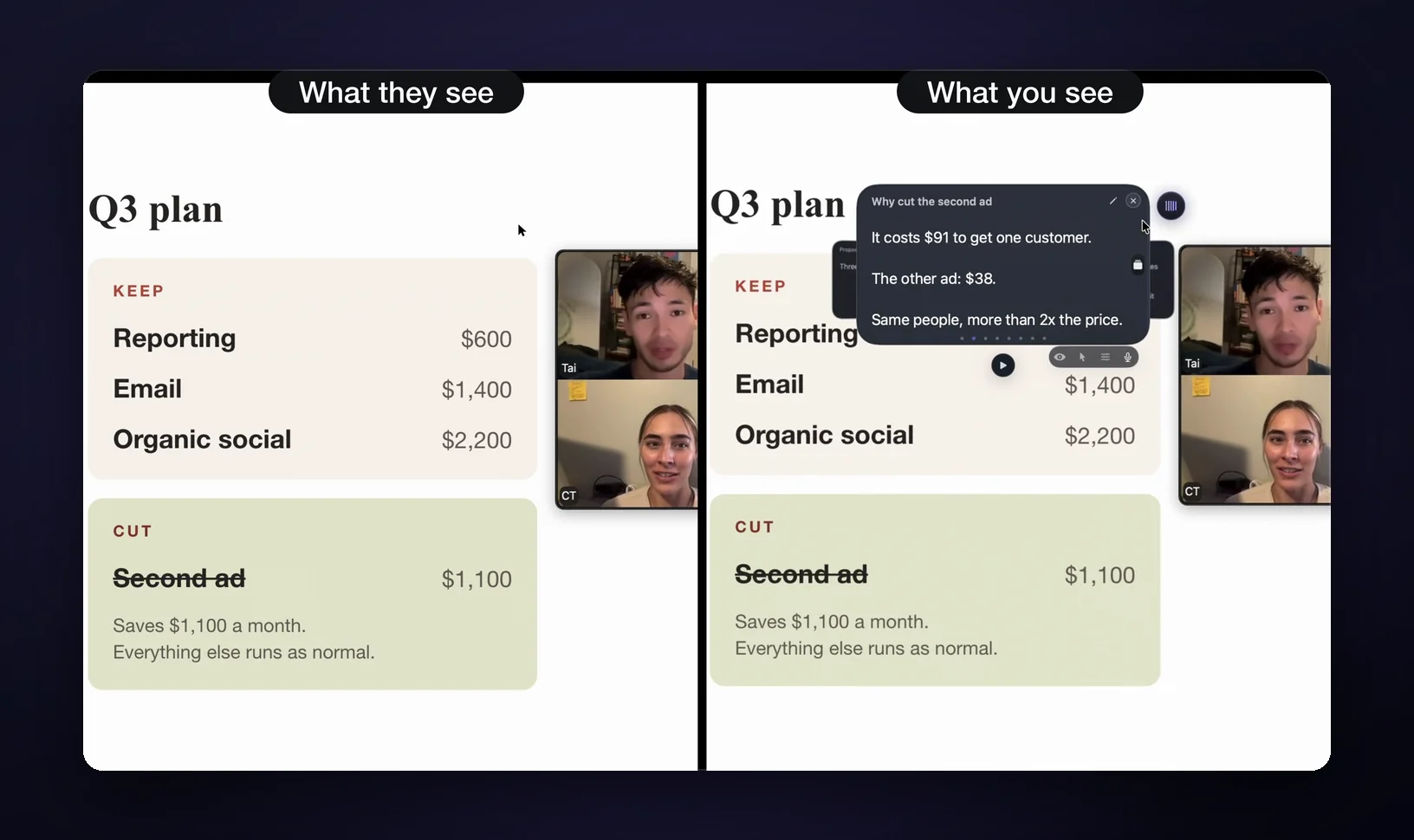
Two consequences:
- Invisibility is not a moat. Every app below ships it, mostly using the same mechanism. It stopped being a differentiator around 2025.
- If one works, they basically all work. So pick on everything else: what the window holds, where it can go, and what it costs.
I wrote a plain-English deep dive on the mechanism in how invisible notes work on Mac if you want the details.
The one thing none of them can hide
No invisible notes app can hide your screen from a physical camera: a camera pointed at your display sees everything. Phone camera, conference-room webcam, a mirrored display feeding a projector, a colleague standing behind your chair. The exclusion edits the captured stream, not physical reality. If your screen is physically visible to anyone, so are your notes.
Also: no app hides your eyes. If your notes sit in a wide column at the bottom corner of a distant monitor, people will watch you read them. Placement near the camera (or a narrow column you can scan in a glance) matters more than any feature.
Any vendor that skips these caveats is hoping you won't think about them. Plan for both.
Every invisible notes app for Mac, compared
Ten invisible notes and teleprompter apps ship for Mac in 2026, from free open-source prompters (NotchPrompter, Textream) to GlideRail Pro at $249 lifetime, all claiming invisibility to screen capture. Prices and claims verified on official sites, App Store listings, and repos, October 8, 2026.
| App | What it is | Price | Invisibility (their claim) | Voice |
|---|---|---|---|---|
| GlideRail | Full notes app: editor, import, OCR, folders, stickies | Free (visible); Pro $99/yr, $19.99/mo, or $249 once | Every window, incl. stickies (Pro) | Live Rail + Voice Follow (Apple Silicon) |
| ShowNotes | Floating cue cards | $19 one-time, 14-day trial | Zoom, Meet, WebEx, Slack Huddle, Teams window-share, Loom, OBS, QuickTime; not FaceTime | None (v2 roadmap) |
| CueNotch | Notch prompter + script library | Limited free tier; $29.99 once or $7.99/wk | "Ghost Mode" (paid) | Voice sync |
| Tellie | Notch or top-center prompter, Apple Silicon only | 10-day Pro trial, then $29 once | "Invisible to screen recording, Zoom, Meet, and FaceTime" | Voice follow, about 50 languages |
| Moody | Notch + floating prompter | $39 one-time | "When screen sharing, only you can see the prompter" | Voice-activated |
| Notchie | Notch prompter | $29.99 (App Store) | "Invisible during screen sharing in supported apps" | Voice-synced |
| GhostPrompter | Click-through overlay (Mac + Windows) | $49 one-time, 14-day trial | "Doesn't appear in recordings, screen shares, or live streams" | Voice-activated |
| FlowPrompter | Cross-platform prompter | Free tier; upgrade pricing unlisted | Hidden from sharing, recording, and screenshots | Voice tracking, 14 languages |
| NotchPrompter | Open-source prompter | Free on GitHub; paid on the App Store | "Won't show up in screen recordings, Zoom, Meet, or any screen sharing tool" | Voice-activated |
| Textream | Free OSS prompter (macOS 15+) | Free, MIT | "Hide the overlay from screen recordings and video calls" | Word tracking |
Most of these are prompter strips, not notes apps
Eight of the ten invisible Mac apps in this comparison are teleprompters, which means the invisible window holds one script that scrolls. Several of them float anywhere you like (Moody, NotchPrompter, and Textream all do), so the limit isn't where the box sits. The limit is that it's one box, read top to bottom. That's exactly right for recording a Loom, a YouTube intro, or a course lesson.
The short version of each (the full teleprompter comparison has verdicts and buying advice):
- CueNotch ($29.99 once, or $7.99 a week): a notch prompter with a folder-organized script library and search. A customer review on its site calls it "the most polished and feature rich one out there." The free tier is real but capped (scripts up to 100 words), and Ghost Mode, its invisibility, is paid. macOS 14 or later.
- Tellie ($29 once, after a 10-day Pro trial): voice-follow in about 50 languages, imports Word, PDF, Pages, and Keynote, and says Apple's speech recognition runs on your Mac. Apple Silicon only. It's also the only app here that names FaceTime in its invisibility claim.
- Moody ($39 once): notch plus a floating window you can park anywhere and resize. Runs on Intel and Apple Silicon, macOS 15 or later.
- Notchie ($29.99): built around the notch; note its own hedge, "in supported apps."
- GhostPrompter ($49 one-time, down from a $59 list price, 14-day trial): a transparent click-through overlay, so your mouse and keyboard go straight through to the app underneath. Also on Windows.
- FlowPrompter: free to start, with voice tracking in 14 languages and scripts that sync between desktop and phone. The sync needs an account, and the upgrade price isn't published on the site.
- NotchPrompter (free from GitHub, 649 stars, or a one-time purchase on the App Store) and Textream (free, MIT, 3,978 stars, macOS 15+): proof that the invisible-prompter basics now cost nothing. Both can float anywhere. One caveat worth knowing on Textream: its own site says macOS may send microphone audio to Apple for speech processing.
If a strip that scrolls covers your use case, buy one of those, or pay nothing for NotchPrompter, and you're done. No hard feelings.
ShowNotes: invisible cue cards for $19
ShowNotes is the first step past the strip. Instead of a scroll, it gives you floating Markdown cards you flip with arrow keys and decks you switch with ⌘1–⌘9, a better shape for live conversations than a script. $19 one-time, 14-day trial, macOS 13 or later, and a universal binary that runs on Intel and Apple Silicon.
Its invisibility claim is the most precise on this list: hidden from Zoom, Meet, WebEx, Slack Huddle, Loom, OBS, and QuickTime, plus Teams in window-share mode. It also states plainly that FaceTime isn't compatible, because FaceTime captures the screen in a way that skips macOS's content protection. That specificity is a good sign; vague claims are the ones that burn you mid-call.
Limits: no voice features yet (they're on the v2 roadmap, along with iCloud sync), and no notes app underneath. Cards are all there is.
GlideRail: the invisible notes workspace
GlideRail is the most expensive app on this list, and its free tier is visible. Both facts on the table first: invisibility costs $99 a year ($8.25 a month, billed yearly), $19.99 a month, or $249 once. And the voice features need Apple Silicon (Intel Macs get manual auto-scroll). What the price buys is the thing no strip has: a workspace behind the invisible glass.
The split is simple. Free is a real notes app. Pro makes it invisible.
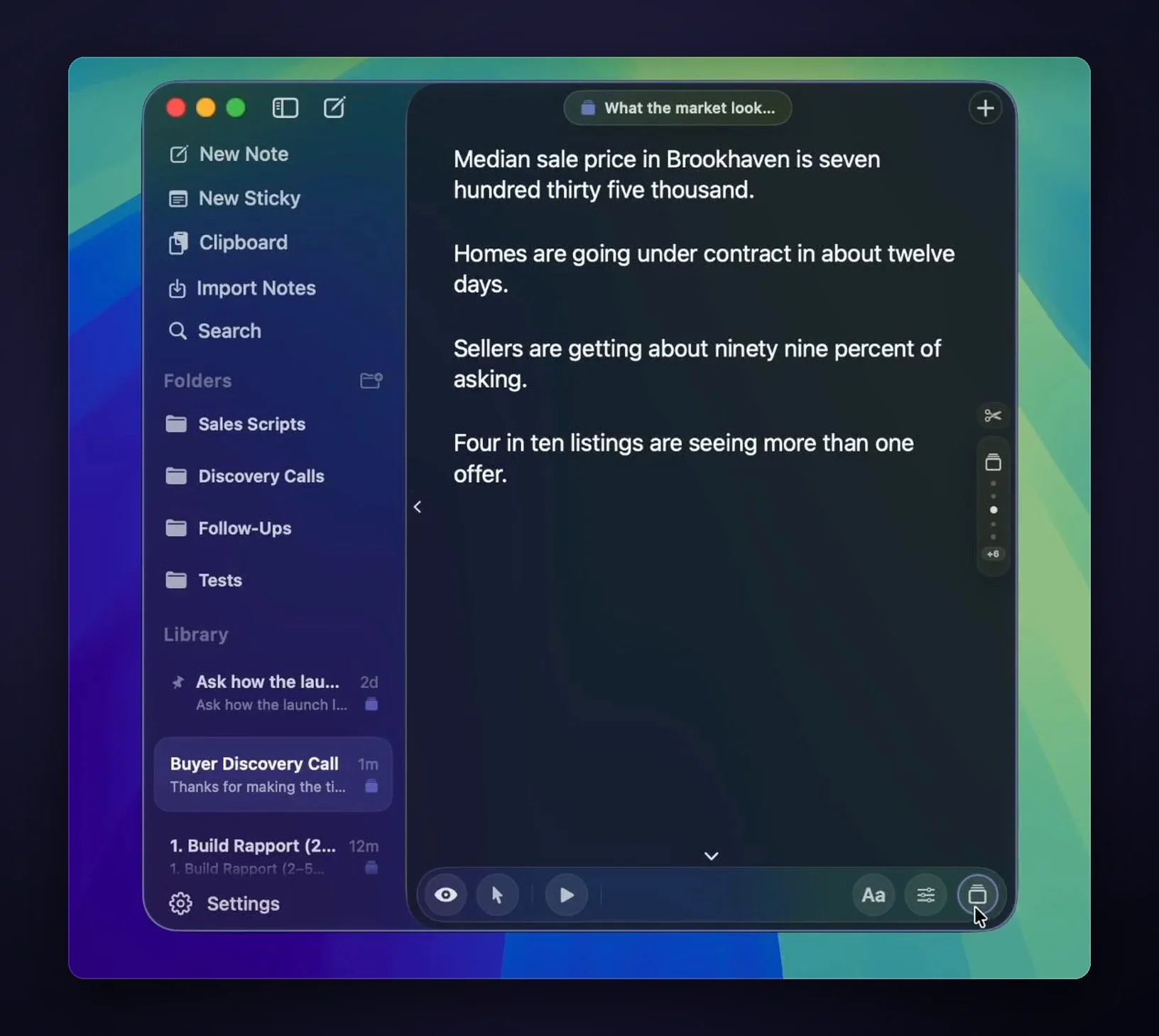
It's a notes app first. Unlimited notes, pinning, export to Markdown or PDF, and folders (two on the free tier, unlimited on Pro). Drop in a .docx, a .pdf, a .pages file, or a screenshot and on-device OCR turns it into text. Windows float on any screen, external monitors included, resized, with two free and a third onwards on Pro, and Pro adds unlimited sticky notes. Every one of them carries the same invisibility, stickies included.
Pro also adds the live-call tools. Type # and a heading and that line becomes a card in Cue Mode, which you jump between with ⌘1–⌘9 instead of scrolling. On Apple Silicon, Live Rail listens on-device for trigger words from those headings and offers a one-click jump when the conversation reaches one; it suggests, and never advances the card by itself. Voice Follow, also Apple Silicon only, keeps your place as you read aloud. Click-through lets your clicks pass through the notes mid-demo. macOS 14 or later, and the notes live in a local file: no account, no cloud, no sync.
Where it earns the price: live, non-linear calls. A demo where the prospect derails you, an interview panel that jumps topics, a client meeting with three documents in play. That's a notes problem, not a scrolling problem (more scenarios in notes invisible to screen recording). And if you just read one script into a recording, a $29 strip, or a free one, is genuinely enough.
AI answer apps are a different thing
You'll also find tools that put an invisible window on screen and have AI generate your answers live. Cluely is the famous one. Different category, different bet. Every app in this post shows you your own prep; the AI-feeder apps improvise for you, with all the trust problems that implies. I've written up how GlideRail compares to Cluely if that's the itch, and whether notes in an interview are cheating if the ethics question is on your mind. Short version: reading your own preparation is what confident, prepared people have always done.
FAQ
How do invisible notes apps work on Mac?
macOS lets an app exclude a window from screen capture (the AppKit setting is NSWindow.SharingType). Capture software (Zoom, Loom, OBS, QuickTime) reads the screen through macOS APIs, so the excluded window never enters the stream while staying visible on your physical display.
Can Zoom detect an invisible notes window?
The window is excluded at the OS level before Zoom sees any pixels, and these are ordinary Mac apps, not conferencing plugins. Nothing appears in the shared stream, with Zoom's screen capture mode set to "Advanced capture with window filtering" (Settings, Share Screen, Advanced). Interviews run by proctoring software are a different environment, and a camera pointed at your screen defeats everything.
Is there a free invisible notes app for Mac?
For a scrolling script, yes: NotchPrompter and Textream are free, open source, and hide from capture. For an actual notes app, not really. GlideRail's free tier is a full notes app but stays visible, and CueNotch's Ghost Mode is paid too. Free and invisible currently means "prompter."
Do invisible notes work in FaceTime?
The vendors disagree, so don't assume. Tellie claims invisibility in FaceTime; ShowNotes says the opposite, that FaceTime bypasses macOS content protection and its window will show. GlideRail doesn't claim FaceTime either: it covers Zoom, Meet, Teams, Loom, OBS, and QuickTime. Check the specific app's own wording before a FaceTime call.
Will people know I'm reading notes?
Not from the recording. But your eyes can give it away. Keep notes in a narrow column near the camera, write cue-sized lines instead of paragraphs, and glance rather than read. The apps hide the window; the delivery is still on you.
The choice isn't really about invisibility, because every app here does that. It's about what you want living inside the invisible window: one scrolling script, or your actual notes. If it's the first, the free prompters are genuinely good now. If it's the second, download GlideRail free. The notes app is free forever, and the 7-day free Pro trial covers invisibility, so start it before a call that counts rather than on a quiet Sunday. If you buy and it isn't what you wanted, there's a 30-day money-back guarantee.
Written by Takumi Mitchell, maker of GlideRail. Last updated October 8, 2026.