How Invisible Notes Actually Work on macOS (the Technical Explainer)
Published 2026-10-01 · 7 min read
Invisible notes on a Mac come from one window property: NSWindow.sharingType, set to the value that gives other processes no access to that window's content. Zoom, Loom, and OBS ask macOS for screen pixels; the flagged window isn't in what they receive. Your physical display still shows everything, so you read normally while the capture doesn't.
That's the answer. The rest is the interesting part: where the property comes from, why the capture app has no say in the matter, what Apple's own documentation says about it in 2026 (less than you'd expect), and what no window flag can ever hide. I make GlideRail, an app built on exactly this mechanism, so weigh the product mentions accordingly. If you'd rather start with the plain-English category overview, that's what is an invisible teleprompter.
What makes a Mac window invisible to screen capture?
A Mac window becomes invisible to screen capture through one AppKit property: NSWindow.sharingType. Every window on a Mac is backed by an object called NSWindow, and Apple's documentation describes sharingType as controlling the level of access other processes get to that window's content. An invisible notes app sets it to the no-access value on every window it creates. The property has shipped with macOS since 10.5 Leopard (2007): a first-party switch older than the App Store, not an exploit.
The values come from an enum, and the interesting one is .none: historically, it meant no other process can read this window's contents at all. GlideRail, a macOS notes app whose windows are invisible to screen capture, sets that value on every window it creates: the main notes windows, the sticky notes, the floating clipboard. A single visible straggler would defeat the whole point.
That's the entire trick. One property, set at window creation. Everything else in this post is about what happens downstream.
Why can't Zoom, Loom, or OBS see the window?
Zoom never decides to hide invisible notes, because Zoom never sees them. Capture apps on macOS (Zoom, Loom, OBS, QuickTime) don't crawl your windows themselves; they ask macOS for screen content, macOS composites the frames, and a window flagged as non-shareable isn't in the frames it hands over. The exclusion happens inside the operating system, upstream of every capture app.
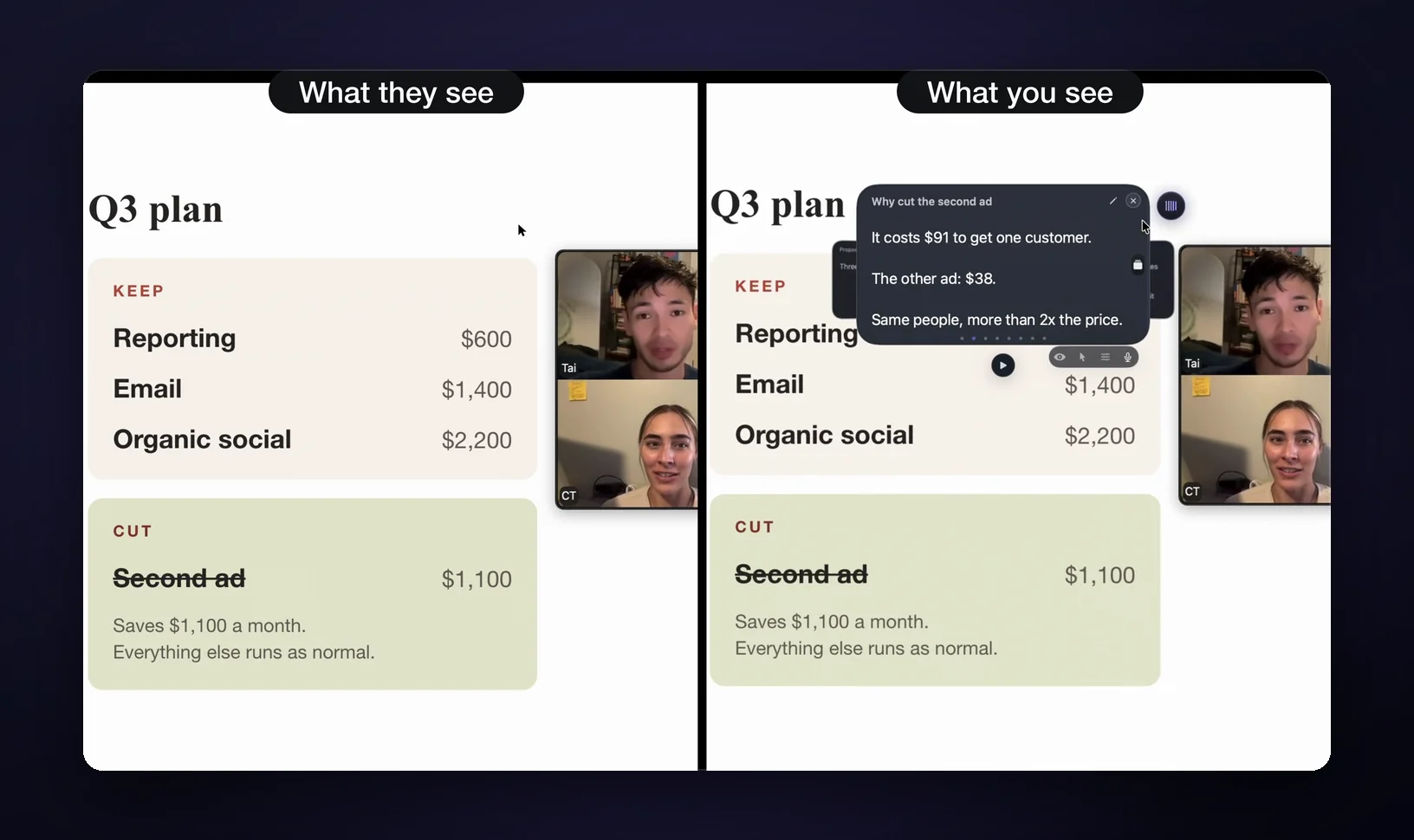
Specifically, when you click share in Zoom, or record in Loom, or capture in OBS, the request goes through Apple's capture pipelines: the older CoreGraphics path, or ScreenCaptureKit, the modern framework for streaming screen content to an app. The capture app receives a desktop where your notes never existed, with whatever was behind the window showing through.
Three things follow from that. Nothing installs into the call software: no Zoom plugin, no virtual camera, no browser extension. The notes app flags its own windows and macOS does the rest.
It also works the same everywhere, because Zoom, Meet in a browser, Teams, Loom, OBS, and QuickTime are all downstream of the same system pipelines. A browser sharing a screen is just another process asking macOS for pixels.
And there's nothing to "reveal." The viewer's side has no toggle, no blur to remove, no hidden layer in the recording file. The pixels were never transmitted or written.
For the Zoom-specific version of this question (including what the other side sees during a full-desktop share), see can Zoom see your other windows?
What's verified not to see GlideRail (August 2026)
As of August 2026, GlideRail's invisible windows are verified absent from Zoom, Google Meet, Microsoft Teams, Loom, OBS, and QuickTime captures, live shares and recordings alike. A flag is a mechanism; a claim needs testing. This is the tested list:
| Capture surface | Sees your notes? |
|---|---|
| Zoom: live share and recordings | No |
| Google Meet: live share | No |
| Microsoft Teams: live share and recordings | No |
| Loom recordings | No |
| OBS capture | No |
| QuickTime / Shift-⌘-5 screen recordings | No |
| Your own physical display | Yes, that's the point |
| A phone camera aimed at your screen | Yes, always |
| A person standing behind you | Yes |
One honest asterisk on the table: in GlideRail, invisibility is a Pro feature. Free-tier windows are deliberately visible and labeled "Visible" in the app, so there's no ambiguity about which state you're in. For how this plays out in a real recording workflow, see notes invisible to screen recording.
The uncomfortable part: Apple now calls the flag "legacy"
Apple's current documentation for the .none sharing value is one sentence: "A legacy constant that macOS no longer uses." The same page points developers who want capture-proof content toward FairPlay, Apple's DRM system for streaming video: a strong hint that Apple doesn't consider a window flag a content-protection contract. This is the part a vendor selling invisibility would usually skip.
And on Apple's own developer forums, real-world reports have gone both ways. One thread describes a window flagged with NSWindowSharingNone still landing in a ScreenCaptureKit capture on macOS 15.4, with Apple's support engineers replying that there are currently no public APIs intended to prevent screen capture. Another thread reports the opposite: ScreenCaptureKit's own sample code initially omitting flagged apps from the stream. The Tauri project documented the same split: the legacy CoreGraphics capture path respects the flag while some ScreenCaptureKit paths don't.
So the precise truth in August 2026 is this: window-capture invisibility is not a spec Apple guarantees. It's OS behavior that has wobbled between capture paths and between macOS releases. Which leads to the only conclusion that matters for you as a buyer: never trust the flag, trust the test. The tested list above exists because the flag alone isn't a promise: every app on it was verified directly, on the macOS versions GlideRail supports (macOS 14+). When you're comparing invisible notes apps, ask every vendor for their tested-against list. A vendor who just says "invisible everywhere" hasn't read Apple's docs lately.
What no flag can ever hide
No window flag hides what's physically on a screen. A phone camera pointed at your display sees your notes, people in the room see them, and your own eyes stay on camera even when the notes don't. The sharingType mechanism removes windows from capture streams, not from the glass. Worth saying twice.
A physical camera sees everything. A phone pointed at your display, a photo of your panel, a colleague's camera catching your monitor in the background: the notes are right there, because they really are on your screen. Light doesn't care about window properties. And people in the room see your screen too (obviously), which makes invisible notes a video-call tool, not a general-purpose privacy shield.
Your eyes are the third thing. The capture never shows your notes; it always shows you. Eyes tracking line by line across a distant monitor read as reading. That's a placement problem (put the notes window near your webcam), not something any flag solves.
FAQ
Does this need a virtual camera or a Zoom plugin?
No. The notes app sets a property on its own windows; macOS excludes them when building capture frames. Nothing runs inside the call software, which is also why the behavior is identical across Zoom, Meet, Teams, Loom, OBS, and QuickTime: they all drink from the same system pipelines.
Do invisible notes work in browser-based calls like Google Meet?
Yes. When Chrome shares your screen, it's just another process requesting pixels from macOS, so the exclusion applies the same way. Google Meet live shares are on GlideRail's verified list. The same logic covers other browser-based tools that share a screen or window from a Mac.
Will a macOS update break invisibility?
It can. Apple labels the flag legacy, and capture behavior has shifted between paths and releases, so treat invisibility as verified-per-release, never guaranteed forever. GlideRail's list of six capture apps holds on the macOS versions it supports as of August 2026. That's also the honest reason vendors keep re-testing.
Are invisible windows missing from screenshots too?
Maybe. Screenshots ride their own capture path, and behavior has shifted between macOS releases. GlideRail publishes what it verifies: live shares and recordings in the six apps above. Treat anything outside a vendor's tested list as visible until you've tested it yourself. It takes thirty seconds.
Do you need Apple Silicon for invisible notes?
No. Invisibility works on any Mac running macOS 14 or later, Intel included. In GlideRail, only the voice features (Live Rail and Voice Follow) require Apple Silicon; invisibility, click-through, and Cue Mode's manual navigation don't care what chip you have.
Why can you see the notes if the capture can't?
Your display shows the full composited desktop: every window, flagged or not, because you're looking at the physical panel. The capture stream is assembled separately for the process that requested it, and the flagged window is left out of that. Two consumers, two different frames.
The cheapest way to believe any of this is to test it on your own Mac. Download GlideRail free: the full notes app is free forever, and the 7-day free Pro trial lets you test invisibility. Flip it on, hit Shift-⌘-5, record ten seconds, and open the file. Your notes won't be in it.
Written by Takumi Mitchell, maker of GlideRail. Last updated October 1, 2026.