How to Answer "That's Too Expensive" on a Zoom Call
Published 2026-11-13 · 6 min read
When someone says "that's too expensive", pause, then ask "Too expensive compared to what?" Their answer tells you whether it's the budget, the value or another quote. Do these five things before your call, and you'll have the words in front of you when it happens.
| Minutes | Do this | Write down |
|---|---|---|
| 0 to 2 | Find what the problem costs them | Their number, in their words |
| 2 to 4 | Pick your question | "Too expensive compared to what?" |
| 4 to 6 | Write your answer | Three lines: their cost, your price, what they get |
| 6 to 8 | Decide what you'd cut | A smaller option, and your lowest price |
| 8 to 10 | Say it out loud twice | Fix any line you stumble on |
It works on a sticky note, and the rest of this page is the detail.
One disclosure: I created GlideRail, a conversation rail for Mac with an Invisible mode (Pro) that keeps your cards out of a screen share. It comes up near the end, as one way to keep those lines in view. The words work without it.
- What to say, line by line
- What does "too expensive" mean?
- What changes on a video call?
- Should you offer a discount?
- Keep your three lines in view
- Which setup should you pick?
What to say, line by line
Say nothing for two seconds first, then ask one question. Gong's page of stats from the calls it records says its best reps pause five times longer after an objection, and ask a question back 54.3% of the time, against 31% for average reps (Gong's sales stats; the page gives no sample size). Fast defending is a common mistake.
These lines are prompts. Put them in your own words, and fill in the brackets before the call.
"Fair enough. Too expensive compared to what?"
Then stop talking and listen.
"If I've got it right, this is costing you about [their number] a month. Is that still true?"
Use their number, not yours. Write it down in discovery so you have it here.
"For [price], you'd get [the outcome they asked for]. Where does that fall short for you?"
Asking where it falls short invites the real objection. It might be the timing, or a partner who hasn't said yes.
"If the budget's the problem, I can do [smaller scope] for [lower price]. What would you want to keep?"
Let them choose what goes. You're changing the scope, not the value of the work.
What does "too expensive" mean?
"Too expensive" usually means one of four things: the budget really isn't there, they don't yet see enough value, they have a cheaper quote, or they have a doubt they haven't said out loud. Each one needs a different answer, and you can't tell which it is until you ask. So don't answer the price. Ask about it.
| What they mean | How it sounds | What to do |
|---|---|---|
| No budget | "We just don't have it this quarter" | Ask when it opens up, or offer a smaller start |
| Not enough value | "I'm not sure it's worth that" | Go back to their number |
| A cheaper quote | "Someone else said half that" | Ask what's included at that price |
| A hidden doubt | "It's a lot, let me think" | "Which part: the price, the timing, or whether it'll work?" |
If you want answers to the rest, the common sales objections post covers ten of them.
What changes on a video call?
On a video call they watch your face at close range, and your eyes can give you away. If you look off to a second screen to find your numbers, they may see it right when they're judging your confidence.
Three small things help:
- Stop sharing your screen before you talk price, so they're looking at you, not a slide.
- Don't reach for a doc. Your three lines should already be where you're looking.
- Let the silence sit. A two-second pause often feels long to you and normal to them. If you think they've frozen, wait one more second.
Should you offer a discount?
Try not to cut the price for the same scope, because it can tell them the first number wasn't real. Offer less for less, or trade the lower price for something you want, such as payment up front or a longer term. Decide your lowest number before the call, and don't say it first.
Know when to walk, too. If their real budget is a quarter of your price, a fast "that's fine, I may not be the right fit" can save both of you a month of emails. The freelance rate rail has the wording if you sell your own time.
Keep your three lines in view
The plan only works if the lines are in front of you at that second. A sticky note on the monitor is fine, and a doc under your camera works if you aren't sharing your screen. The trouble starts when you're mid-demo with your whole screen shared, because a doc or a Sticky goes out with the share.
GlideRail keeps what you prepared on your side of the screen. Write your answer as a card called "Too expensive?", in Cue Mode (Pro), and ⌘[ and ⌘] reach it from any app while Cue Mode is open. Invisible (Pro) keeps the card out of the share and Zoom's recording once Zoom is set up for it: set Screen capture mode to "Advanced capture with window filtering" first, as this Zoom guide shows.
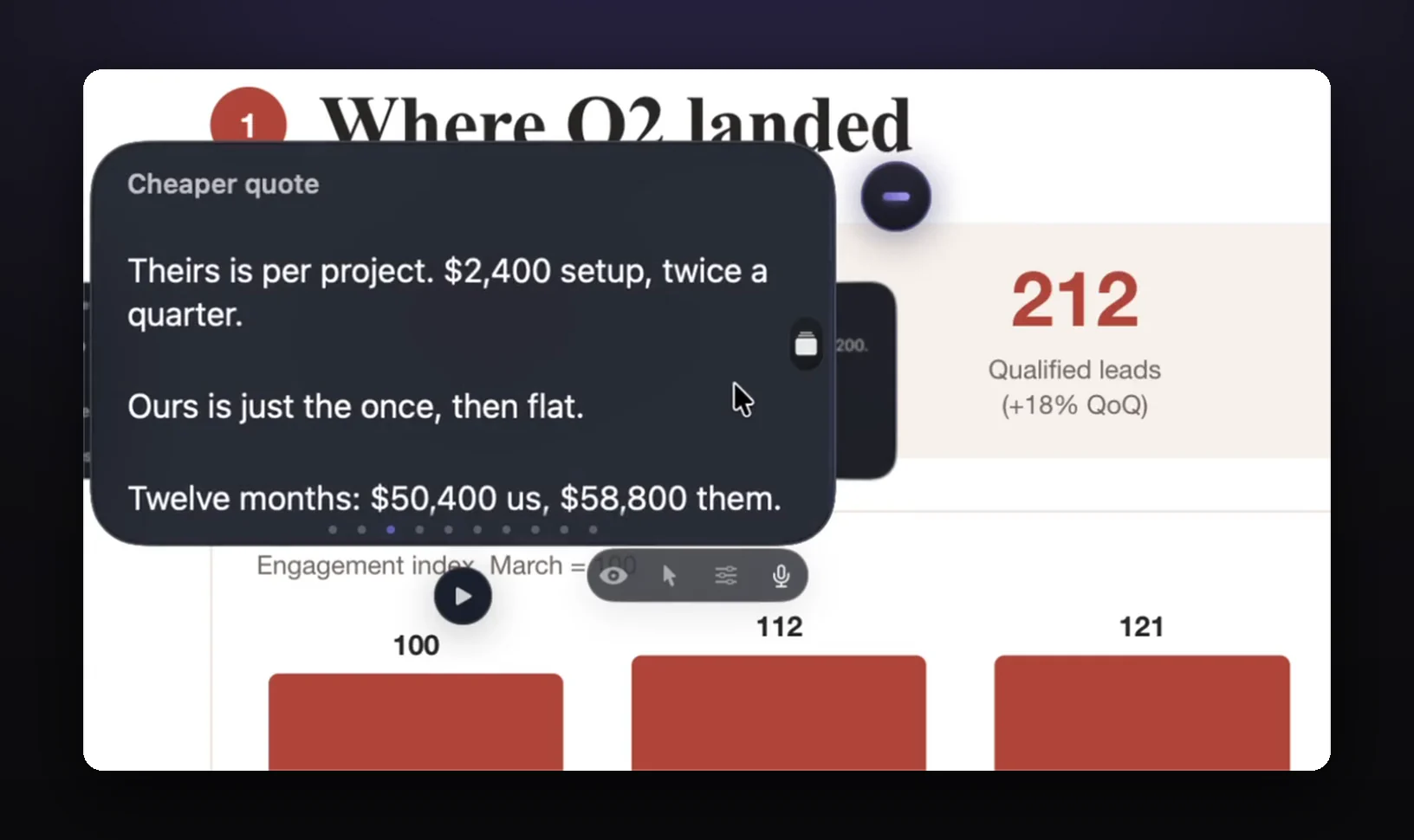
On an Apple Silicon Mac, Live Rail (Pro) listens on your Mac, and when someone says words that match a card, it offers that card in a small chip. One click or ⌘↩ opens it, and it never changes cards by itself. It matches words, not meaning: "too expensive" can offer your card, and "that's a stretch for us" won't.
Nothing in GlideRail writes your answers, so you'll still need the ten minutes above. A phone camera pointed at your screen sees your cards, and on the free version your windows show in a share. A ready set of price cards is on the pricing objection rail, free to copy.
Which setup should you pick?
If you talk price once or twice a month, write it on paper and stick it to the monitor. That's free and it works.
If you never share your screen, a doc under your camera will do, and GlideRail's free version covers that too. If you talk price on shared-screen calls every week, you may want something that stays out of the share, and that's what GlideRail Pro is for.
FAQ
What's the best response to "that's too expensive"?
A pause, then "Too expensive compared to what?" It's short, it doesn't defend anything, and the answer tells you whether you're dealing with budget, value or a cheaper quote. Answer only after you've heard which one it is.
Should I lower my price if a client says it's too high?
Not for the same work. Offer a smaller scope at a lower price, or ask for something in return, such as payment up front. If you drop the price the moment they push, they'll wonder what the real price was, and so will their next referral.
How long should I pause after a price objection?
Count to two before you speak, then ask your question and stop. It'll feel long on a video call, but it reads as thinking. Don't fill the gap with reasons. If they keep talking, you've learned something for free.
What if they say it's too expensive and go quiet?
Ask one soft question: "Which part feels like too much?" If they still don't say, offer the next step anyway: "Want me to send a smaller option, and we talk Thursday?" Then book the time before you hang up.
Does GlideRail answer objections for me?
No. It shows what you wrote, and it adds nothing of its own. Live Rail only offers your own cards when the words match, and it listens on your Mac. The privacy policy lists what the app does send, and none of it carries notes or audio.
Try it on one call
Download GlideRail free, paste your three lines under a # heading, and press Split into sections. Every download comes with a 7-day free Pro trial, so you can run Cue Mode on a real call, and if you buy later there's a 30-day money-back guarantee. The next time someone says it's too expensive, your question will already be on your screen.
Written by Takumi, maker of GlideRail. Last updated November 13, 2026.