Common Sales Objections and What to Say on a Live Call
Published 2026-11-04 · 8 min read
Most sales objections come down to six things: price, budget, timing, who decides, trust, and the option they already have. Your first move is the same for all of them. Don't defend. Ask one short question that shows what they mean, then answer that. Below are 10 objections in the words buyers use, each with the question to ask back.
One disclosure: I created GlideRail, a conversation rail for Mac whose windows are invisible to screen capture. It comes up in the second half. Everything before that works on paper.
- The 10 objections at a glance
- What to say to each one
- How do you handle an objection on a video call?
- Keep each answer one glance away
- Which setup should you pick?
The 10 objections at a glance
These 10 sales objections are written the way a buyer says them, because that's how you'll hear them. The middle column is the usual meaning, which is a guess until they confirm it. The last column is your first sentence back, and every one of them is a question or an invitation to say more.
A short list goes a long way. When Gong analyzed more than 300 million cold calls, the top 5 objections made up 74% of all objections. That's cold calling rather than booked video calls, so your list won't match it exactly, but you'll hear the same few things again and again.
| What they say | What it often means | What to say first |
|---|---|---|
| "It's too expensive" | Too much for the budget, or for what they'd get | "Too expensive compared to what?" |
| "We don't have the budget" | No money now, or it isn't theirs to spend | "Is that no budget at all, or not until a certain month?" |
| "I need to talk to my partner" | Someone else decides, or it's a polite exit | "What do you think they'll ask?" |
| "Now isn't a good time" | Something else comes first | "What needs to happen first?" |
| "We already use someone for this" | Switching feels risky | "What's working, and what would you change?" |
| "Send me some information" | A polite way off the call | "Happy to. What should it cover?" |
| "We need to think about it" | One specific doubt they haven't said | "Which part: the price, the timing, or whether it'll work?" |
| "We tried this before and it didn't work" | They got burned | "What went wrong last time?" |
| "Can you do it cheaper?" | Testing your floor | "I can do less for less. Which part would you drop?" |
| "How fast will we see results?" | They're worried it won't work | "What would you need to see, and by when?" |
What to say to each one
Each objection below gets what's usually behind it and what to do after your first question. These are prompts to put in your own words. Read them word for word and the buyer will hear it.
"It's too expensive"
Find out which kind of expensive it is. Too much for the budget is a money problem, and too much for what they'd get is a value problem you can still fix. Go back to the number they gave you earlier in the call: what the problem costs them today. For the longer version, the pricing objection cards are free to copy.
"We don't have the budget"
Ask who owns the budget and when it's set. Then offer a smaller first step if you have one. If there's no money and no date, say so out loud and book a check-in. That's better than a follow-up that never gets an answer.
"I need to talk to my partner"
Treat this as real. Ask what they'll be asked, then help them answer it. The best next step is a short call with the other person on it, so offer two times before you hang up.
"Now isn't a good time"
Ask what's in the way and what happens if nothing changes for six months. Sometimes the timing is true, and you'll hear a real date. If the problem can wait six months, it isn't urgent for them, and it's better to learn that today.
"We already use someone for this"
Don't attack their current option. They chose it, and criticizing it criticizes them. Ask what's working and what they'd change, and if nothing needs changing, you've saved both of you a month of follow-ups.
"Send me some information"
Say yes, then ask what it should cover and when you can talk about it. If they won't give you a time, you've learned something. Put the time in the calendar while you're both still on the call.
"We need to think about it"
"Totally" is fine here. Then ask which part they want to think through: the price, the timing, or whether it'll work. If they name one, that's the objection you can answer. The demo follow-up cards are for the call where you pick this back up.
"We tried this before and it didn't work"
Stop selling and let them tell the story. Write down what went wrong in their words. Then say what you'd do differently on that exact point, and only what you've done before.
"Can you do it cheaper?"
Try not to cut the price for the same scope. Offer less for less and let them choose what goes, or trade the lower price for something you want, like payment up front. If they'd rather keep everything, the full scope matters to them, and you can go back to why.
"How fast will we see results?"
Give a first result and a date you've hit before. A slower honest answer beats a fast one you'll have to explain later.
How do you handle an objection on a video call?
You handle an objection on a video call in four steps: pause, ask, answer the real concern, and check that you did. Video adds one problem a phone call doesn't have. They can see your eyes, so the second you spend looking for your answer is a second they're watching you look.
The usual mistake is talking too much. In Gong's study of 67,149 call recordings, average reps met an objection with a "knee-jerk" monologue of 21.45 seconds, while successful sellers paused longer and asked questions to clarify the concern.
- Pause. Let them finish, then wait a beat. Jumping in sounds defensive.
- Ask. Use the first line from the table. You're finding out which objection this is.
- Answer that one thing. One point and one piece of proof, then stop talking.
- Check. "Does that cover it, or is there something else?" Then go back to the next step you wanted.
The discovery call questions matter here too. An answer lands when you can use the buyer's own numbers, and you only have those if you asked for them earlier.
Keep each answer one glance away
You probably know what you'd say to these objections. The trouble is that the words aren't there when the buyer says it. Writing one short card per objection fixes that, and it works anywhere you can see it: on paper by the keyboard, in a doc on a second screen, or in a window by your camera.
Name each card the way the buyer says it ("It's too expensive", not "Pricing objection 1"), and keep it to three lines: the question to ask back, your answer, one piece of proof. A card you can't read in a glance won't help you mid-sentence.
Paper has a limit: your eyes drop away from the camera, and ten objections is a lot of sheets. A doc on your screen has the opposite problem: it shows up the moment you share your whole screen, pricing floor included.
GlideRail is built for this, and everything in this paragraph and the next is Pro. Each # heading in a note becomes a card in Cue Mode, so the 10 objections become 10 cards you swipe through or step through with ⌘[ and ⌘], from any app. The window sits by your camera and stays out of screen shares and recordings. (On Zoom, set Settings, Share Screen, Advanced, Screen capture mode to "Advanced capture with window filtering" first.) A camera pointed at your screen still sees it, of course.
Live Rail is the part that changes objections. On an Apple Silicon Mac, it listens on your Mac for words that match your card headings, and when the buyer says them, the card is offered in a small chip. In the shot below, the chip is offering a card named "Budget got cut" and showing its first lines. One click or ⌘↩ opens it, and it never changes cards on its own.
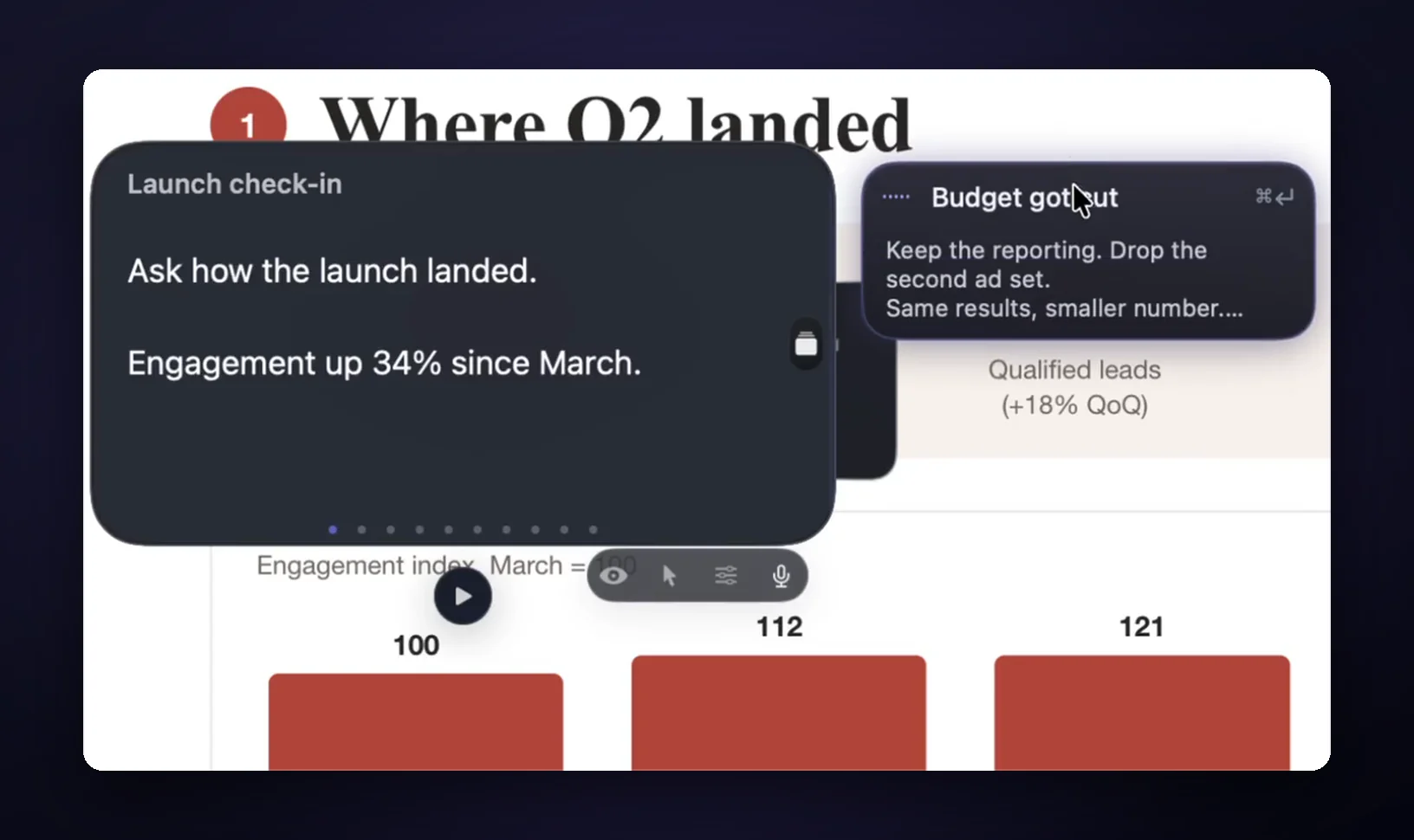
It only brings up your own cards, and nothing writes your answers on the call. It listens for your headings, which is one more reason to name cards in the words you actually hear.
Which setup should you pick?
The right setup depends on how many calls you take and whether you share your screen. If you sell on video once or twice a month, don't pay anyone: print the table above and keep it by your keyboard.
If you never share your whole screen, a doc or any window under your camera will do, and GlideRail's free version covers that. If you run demos on a shared screen every week, you need something that stays out of the share, and that's where GlideRail Pro earns its price.
FAQ
What are the most common sales objections?
Price, budget, timing, authority, trust and the current option. In a buyer's words: "It's too expensive", "We don't have the budget", "Now isn't a good time", "I need to talk to my partner", "We tried this before", and "We already use someone for this".
What is the first thing to say to an objection?
A question. "Compared to what?" or "Which part?" shows you what they mean before you answer. Answering right away usually means answering the wrong objection, and it sounds defensive.
Is an objection a bad sign?
Usually not. A buyer who says what's bothering them is still in the conversation. The harder call is the polite one where nobody objects and nothing happens afterward.
Should I write out my objection responses?
Write prompts, not paragraphs. Three short lines per objection is plenty: the question back, your answer, one proof point. Say it in your own words, because a full paragraph read aloud sounds read.
Does GlideRail answer for me on the call?
No. On a live call it only shows your own cards. Live Rail offers a card when the words match its heading, and it never moves without your click. No audio is saved or sent anywhere.
Try it on one call
Download GlideRail free, paste your objections in, each under a # heading, and press Split into sections. Every download comes with a 7-day free Pro trial, so you can run Cue Mode on a real call, and if you buy later there's a 30-day money-back guarantee. The next time a buyer says it's too expensive, you'll have the question in front of you.
Written by Takumi, maker of GlideRail. Last updated November 4, 2026.