GlideRail vs CueNotch (2026): An Honest Comparison From the GlideRail Side
Published 2026-10-01 · 8 min read · Competitor facts last checked 2026-10-01
CueNotch is the cheaper, easier buy: $29.99 lifetime on the Mac App Store, your words parked by the camera, voice-sync built in. GlideRail costs more ($99 a year, $19.99 a month, or $249 lifetime) and is a different shape of app: a full notes workspace whose windows are invisible to screen capture and float anywhere. One box versus a workspace.
First, the bias: we make GlideRail
I built GlideRail. That makes this comparison suspect by default, so here's how I'll earn the read. Every CueNotch fact below comes from cuenotch.com or its Mac App Store listing, checked on October 1, 2026. CueNotch's wins come first, and they're real. Where I couldn't verify something, I say so instead of guessing.
If you're shopping the whole category, start with our Mac teleprompter roundup and come back.
Where CueNotch wins
Price first. CueNotch Pro is $29.99, once. GlideRail's Lifetime license is $249, far more than that, and our featured Annual plan is $99 a year ($8.25 a month, billed yearly). If you want the cheapest permanent license in this category, CueNotch is it, full stop. (CueNotch also sells a $7.99-per-week subscription. Skip that one; four weeks costs more than its own lifetime.)
Then the free tier. CueNotch free gives you 3 teleprompter activations a day with notes up to 100 words, and its site says voice scrolling is included. That's a short intro take every day, forever, for $0. CueNotch also offers a free 3-day Pro trial. GlideRail's free tier is a different trade; more on that below.
Distribution is a real win. CueNotch lives on the Mac App Store: one-click install, Apple's billing, Apple's refund process. GlideRail is a direct download. Some people (and some IT departments) only install from the store. Fair point.
Momentum favors them too. CueNotch's site showcases a 507-upvote, 129K-view r/MacOS thread; it's the best-known app in this niche as far as I can tell. Honesty cuts both ways, though: when I checked the US App Store listing on October 1, 2026, it didn't yet have enough ratings to display a score. So read adoption claims (theirs and ours) as marketing until Apple shows numbers.
The AI extras are all CueNotch's. Magic Polish rewrites your notes. Practice mode gives AI feedback on your pace, pauses, posture, and framing. Memorize Mode chunks text for practice, and AutoCaption does live captions. GlideRail has none of this, on purpose. The only AI in GlideRail runs on-device: OCR for imported images, and the speech models behind Live Rail and Voice Follow. Nothing writes your lines. If you want AI writing help, CueNotch has it and we don't.
And Intel Macs. CueNotch's site lists support for both Apple Silicon and Intel. GlideRail runs on any macOS 14 Mac, but our voice features need Apple Silicon; on an Intel Mac you get manual auto-scroll and nothing that listens.
What both apps already do: the table stakes
Invisibility is not a moat in 2026. CueNotch's Ghost Mode hides it from Zoom, Meet, Teams, Loom, OBS, screenshots, and recordings. GlideRail's invisible windows hide from the same list (it's a Pro feature for us). Both apps follow your voice, GlideRail on Apple Silicon Macs only. Both have a folder library. Any app in this category selling those three as unique is behind the market.
| CueNotch | GlideRail | |
|---|---|---|
| Price | $29.99 lifetime or $7.99/week | $99/yr, $19.99/mo, or $249 once |
| Free tier | 3 activations/day, 100-word notes | Full notes app, unlimited notes, but windows are visible in shares |
| Invisible to Zoom, Loom, OBS | Yes (Ghost Mode) | Yes (Pro) |
| Voice-following | Voice Sync, on-device | Voice Follow + Live Rail, on-device (Apple Silicon only) |
| Library | Searchable folder library | Notes library, folders, find by title |
| Placement | Notch, or a top-center overlay near the camera | Anywhere on any screen; multiple windows + sticky notes |
| Click-through | Not advertised on their site (as of Oct 2026) | Yes (⇧⌘E), plus View Lens |
| Import | Not listed on their site | .txt .md .docx .pages .pdf and more, image OCR, Evernote .enex |
| Runs on | macOS 14+, Apple Silicon and Intel | macOS 14+; voice features need Apple Silicon |
| Install | Mac App Store | Direct download |
Where GlideRail wins: your notes go where you look
GlideRail wins on placement because CueNotch's design is a bet on one spot: your words sit in the notch, next to the camera (on Macs without a notch, in a top-center overlay near the camera). For a one-take talking head at your laptop, that's the right bet.
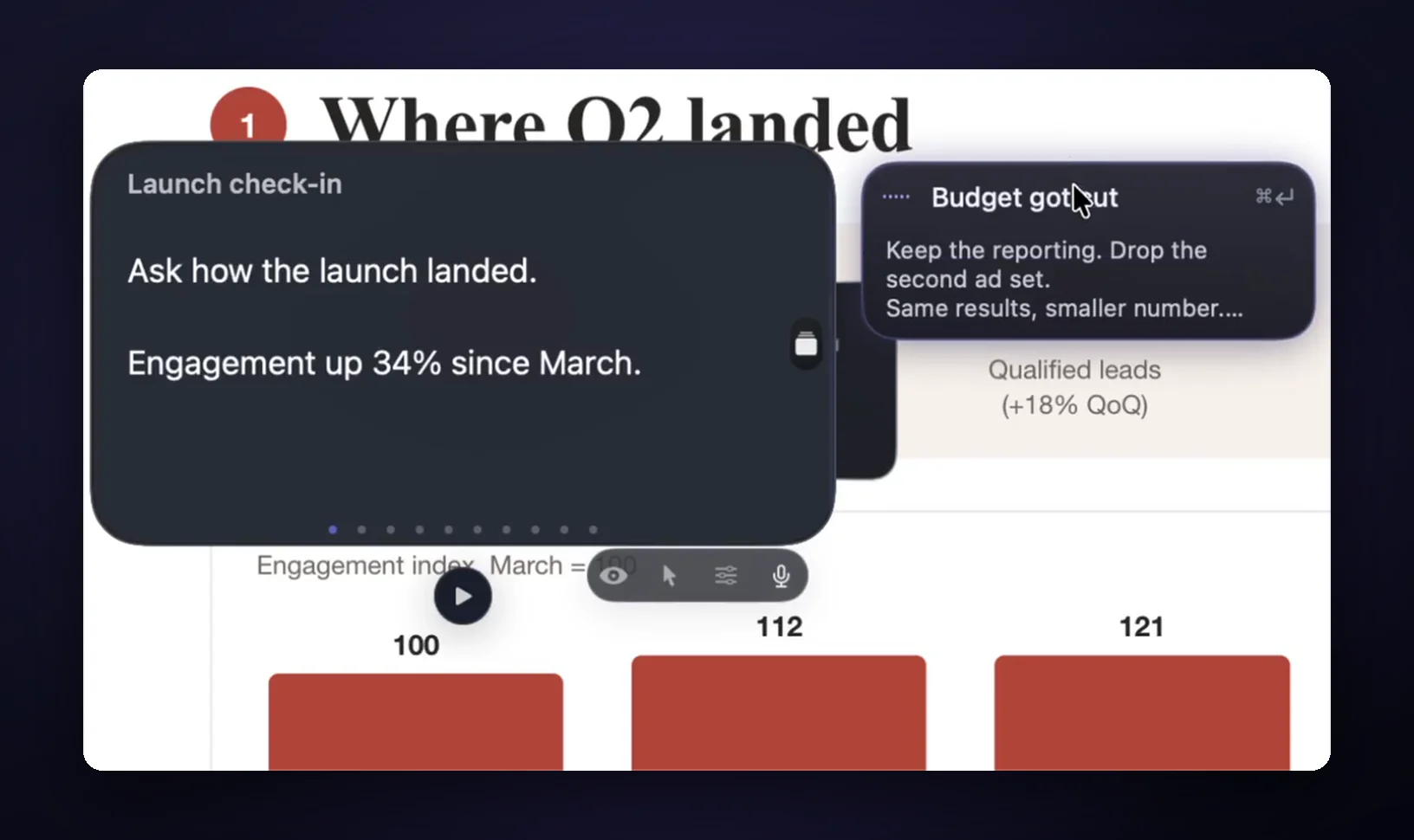
GlideRail bets on placement instead. Windows float anywhere: beside the window you're sharing, on an external monitor right under your webcam, stretched tall next to a slide deck. Resize them. Open more than one (two free, unlimited on Pro). Scatter sticky notes around a demo. Hide everything instantly with ⌘'. All of it invisible to the share. And if you genuinely love the notch, GlideRail has a Notch Mode too.
I can't tell you from CueNotch's site how it behaves on an external display, so I won't guess. I can tell you GlideRail treats every screen the same, because half of real presenting happens on a monitor, not a laptop lid.
Then there's click-through: press ⇧⌘E and the window ignores your clicks, so you can drive a live demo straight through your notes. A hover "View Lens" stays interactive when you need to scroll. One box by the camera can't do that job.
Where GlideRail wins: it's a notes app first
GlideRail free is a real notes app: unlimited notes, rich text with native tables, clickable checklists, a Reading Aid highlight, per-paragraph copy buttons, auto-scroll, two windows, export to Markdown or PDF. Pro is what makes it invisible.
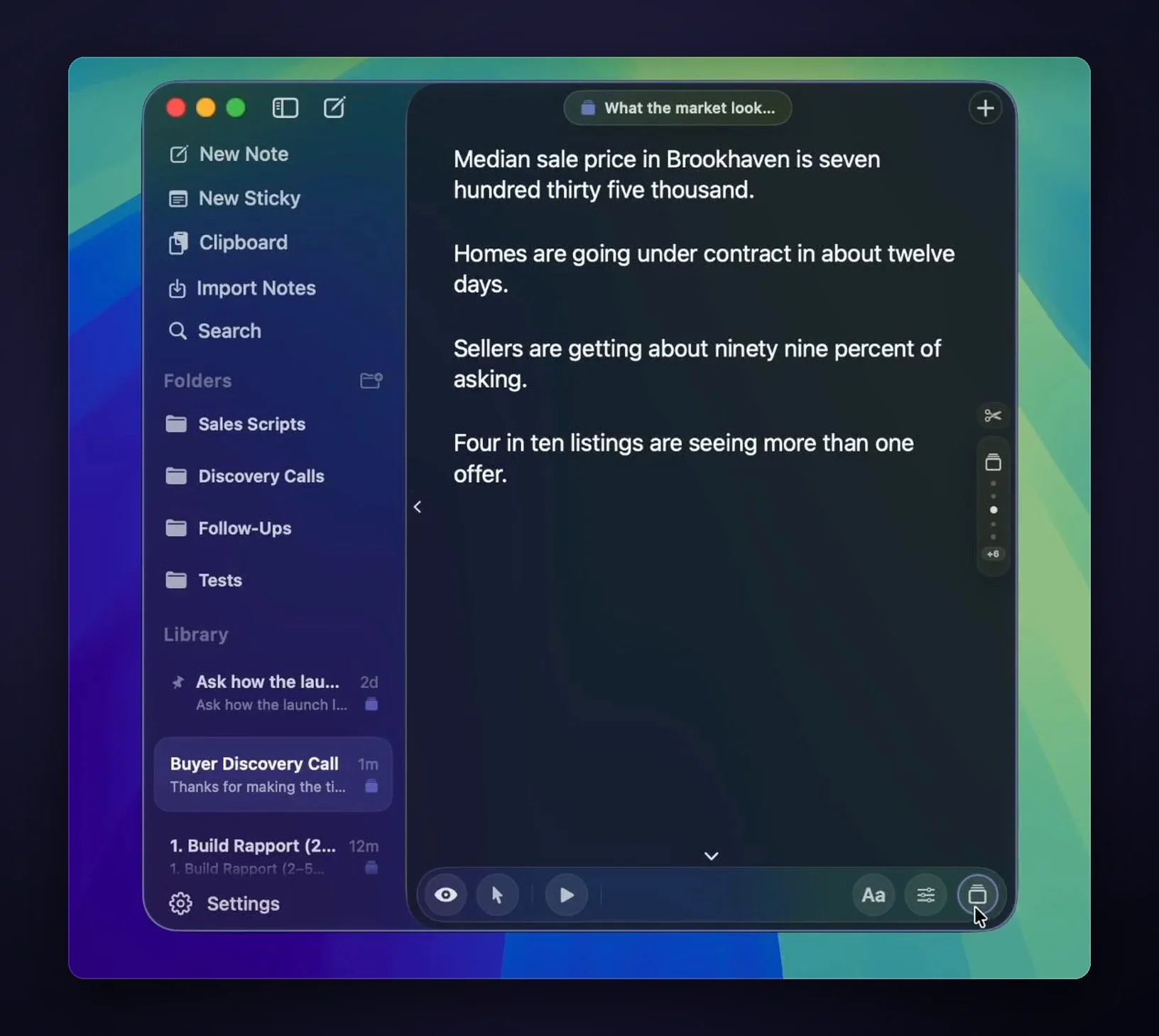
Getting your existing material in is the unglamorous part that matters. Drop .txt, .md, .rtf, .docx, .pages, .html, or .pdf files straight into GlideRail. Drop images and on-device OCR turns them into text. "Import Notes…" (⇧⌘I) swallows Evernote .enex exports and whole folder trees. A prompter you have to paste into, 100 words at a time, is a different tool.
And live calls are non-linear. GlideRail's Cue Mode (Pro) turns a note's sections into cards you jump between (⌘1 through ⌘9, ⌘[ and ⌘], or a two-finger swipe), because the client asks about pricing before you get there. Live Rail (Apple Silicon, in Cue Mode) listens on-device for trigger words from your headings and offers the right card: a chip names the matching card, and one click jumps. It suggests; it never auto-advances.
The flaws on our side
We cost more: $249 lifetime versus $29.99, and if price decides it, CueNotch wins. Invisibility is Pro, so GlideRail's free windows are visible in shares; free is a notes app, Pro makes it invisible. Voice needs Apple Silicon: Live Rail and Voice Follow don't exist on Intel Macs, and you get manual auto-scroll there.
There's no AI polish, coach, or captions in GlideRail; if you want those, that's CueNotch. We're not on the Mac App Store, only direct download. And a phone camera pointed at your screen sees everything, in GlideRail and CueNotch alike. No software beats optics, and anyone who implies otherwise is lying to you.
Verdict: two answers for two kinds of people
Buy CueNotch if you record short takes at your laptop, want the cheapest lifetime license, prefer App Store billing, run an Intel Mac, or want AI rewriting and rehearsal feedback. It's a solid one-box prompter at a fair price, and its free tier means you can prove that yourself today.
Buy GlideRail if your calls are live and jump around, you demo software while presenting, your setup includes an external monitor or an Apple Silicon Mac you want listening on-device, you have folders of existing notes to import, or you want the app to be worth keeping even if you never pay. Plans are $99 a year ($8.25 a month, billed yearly), $19.99 a month, or $249 lifetime (see pricing).
A third option exists: if multilingual voice-follow is your deciding factor, Tellie ($29, Apple Silicon only) beats both of us there. The three-way comparison covers it.
The cheap way to decide: download GlideRail free. The notes app is free forever, and the 7-day free Pro trial is best spent on a real call, not a weekend of fiddling. Run CueNotch's free tier the same week and see which one you reach for.
FAQ
Is CueNotch cheaper than GlideRail?
Yes. CueNotch Pro is $29.99 one time (or $7.99/week; avoid that). GlideRail is $99 a year, $19.99 a month, or $249 lifetime. If lowest total cost is your only criterion, buy CueNotch. GlideRail's premium pays for the notes workspace: multiple windows, stickies, click-through, import with OCR, and a full editor.
Do both apps hide from Zoom, Loom, and OBS?
Yes. CueNotch's Ghost Mode and GlideRail's invisible windows both stay out of Zoom, Meet, Teams, Loom, OBS, and screen recordings. On GlideRail it's a Pro feature; free users' windows are visible. Neither app can hide from a phone camera pointed at your physical screen.
Does GlideRail's voice-following work on Intel Macs?
No. Live Rail and Voice Follow need Apple Silicon's Neural Engine and don't exist on Intel Macs; you get manual auto-scroll (speed 1–20, Space to play/pause) instead. CueNotch's site lists Intel support. Details in our Intel Mac breakdown.
Is CueNotch on the Mac App Store?
Yes: it's listed as "CueNotch - Notch Teleprompter," free with in-app purchases for Pro. As of October 1, 2026, the US listing didn't yet have enough ratings to display a score. GlideRail is not on the App Store; it's a direct download with a license that activates on 2 Macs.
Can either app hide my notes from someone filming my screen?
No. Invisibility works against software capture: screen shares, recordings, screenshots. A physical camera aimed at your display sees your notes in both apps. If your risk is a proctored exam or someone filming over your shoulder, no teleprompter app protects you, and you shouldn't trust one that claims to.
Does GlideRail rewrite my notes with AI?
No. GlideRail has no generative AI and no cloud AI. The only AI on board runs on-device: OCR for imported images, and the speech recognition behind Live Rail and Voice Follow. Your notes are your own prep, stored as local files: no account, no sync, nothing leaves your Mac.
Written by Takumi Mitchell, maker of GlideRail. Last updated October 1, 2026.