Is There an App That Pops Up Your Note When a Client Says a Word?
Published 2026-11-10 · 6 min read · Competitor facts last checked 2026-11-08
Yes. Sales teams call it a live battlecard: you write a card, list its trigger words, and it appears when someone says one on the call. Spiky, Nooks, Dialpad and Revenue.io all show cards or alerts live on a call, and they're built for teams. GlideRail does it for one person on a Mac: it matches each card's heading and a few of its distinctive words, so you don't set trigger words, and it offers the card in a chip you click. You write every word.
One disclosure: I created GlideRail, a conversation rail for Mac whose windows are invisible to screen capture. It's the last option below, and if you sell in a team with a CRM, one of the others likely suits you better. Everything about the other tools comes from their help pages, a pricing page and their own blog posts as of November 8, 2026, not from hands-on use.
- The options at a glance
- What is a live battlecard?
- Which sales tools show a card on a trigger word?
- What can a solo seller on a Mac use?
- How do you write cards that fire at the right moment?
- Where this falls short
- Which one should you pick?
The options at a glance
| Tool | Where the card shows | Needs | Who writes the card | Built for |
|---|---|---|---|---|
| Spiky | Its Real-Time panel, Battlecard tab | Premium plan or higher, listed at $40 and $49 a user a month | An admin | Teams |
| Nooks | Its dialer | An AI Coaching Assistant seat, and call recording that captures the prospect | Admins, or you for private cards | Reps on a dialer |
| Dialpad | Live on the call in Dialpad | Real-time Assist, a paid add-on to Pro and Enterprise | Managers | Teams on Dialpad |
| Revenue.io | A notification on the rep's screen | Its Moments feature, built into Salesforce | Not stated on its page | Salesforce teams |
| GlideRail | A chip beside your card, on your Mac | GlideRail Pro (from $19.99 a month) and an Apple Silicon Mac | You | One person on calls |
| A printed sheet | Your desk | A printer | You | Calls once a month |
What is a live battlecard?
A live battlecard is a short note that appears during a call when a word or phrase comes up. You write it before the call. Software listens, spots the word, and shows the note, so you don't go looking for it while a client waits. The card text is yours. Only the matching is automatic.
Nooks caps live cards at 500 characters.
Which sales tools show a card on a trigger word?
Spiky and Nooks show a card on a trigger word, and Dialpad and Revenue.io show cards or alerts live on a call too. All four fit inside a team's sales setup. Spiky allows up to 5 keywords a card, and only admins create them. Nooks fires on the prospect's words only, with fuzzy matching, so similar-sounding words can fire a card too.
Two details matter if you asked this question because you don't want AI in your call. Nooks says call recording has to capture the prospect's audio, or its live cards won't run. Dialpad's cards are an add-on on top of a paid phone plan. Spiky's help page doesn't say whether a bot joins, so ask before you buy.
If your company already pays for one of these, use it. The reporting and shared cards are worth having in a team, and GlideRail has neither.
What can a solo seller on a Mac use?
A solo seller on a Mac can use GlideRail's Live Rail, part of Pro on Apple Silicon Macs. You write your prep as cards in Cue Mode. Live Rail then listens on your Mac, and when you or the client say words from a card's heading or its most distinctive words, it offers that card in a small chip. Nothing joins the call. It matches words, not meaning, so a card named "Too expensive" won't fire on "that's a stretch for us".
The chip names the card and stays for about 30 seconds. One click or ⌘↩ opens the card, and if you ignore it, it goes away. It never changes the card by itself, which matters when you're mid-sentence.
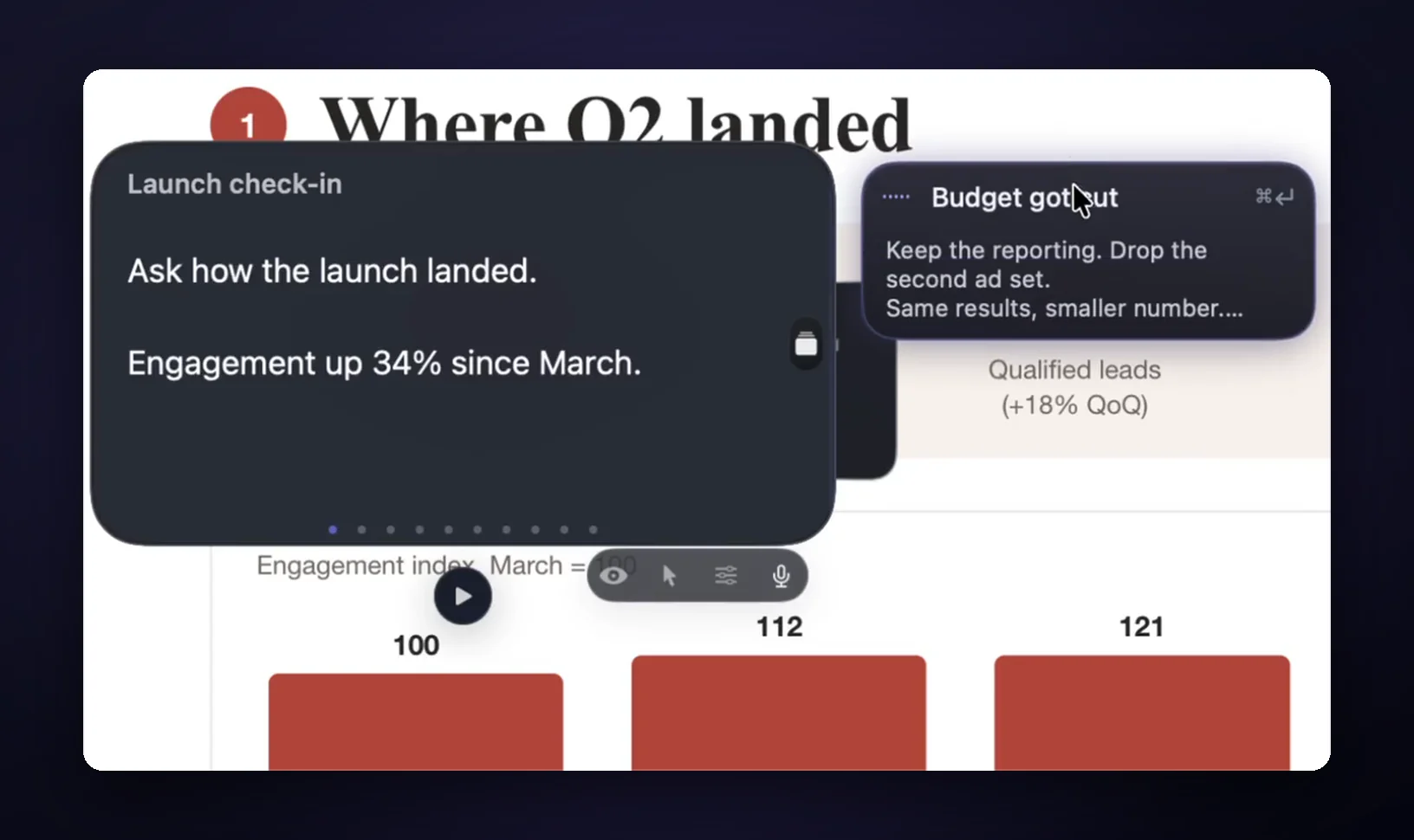
No generative AI is involved. Speech recognition runs on your Mac, and no audio is saved or sent. You turn it on yourself by clicking the circle beside the card, and it hears both sides, so it needs Microphone and Screen Recording permission the first time.
If you share your screen, Invisible (Pro) keeps the cards out of the share and the recording. On Zoom, that needs "Advanced capture with window filtering", as the Zoom setting guide shows.
How do you write cards that fire at the right moment?
Name each card the way the client would say it, because the matching runs on their words. "What does it cost?" fires when they ask about cost. "Pricing objection 1" fires on nothing, since no client says that. Keep each card to three lines: a question back, your answer, one piece of proof.
Five cards cover most first calls: price, timeline, what happens if it fails, who else uses it, what's next. The common objections post has wording you can copy, and the pricing objection rail is a ready-made set.
Keep the headings different from each other. Live Rail matches a card's heading plus a few of its most distinctive words, so a heading that shares its words with another card gives it less to go on.
Where this falls short
Live Rail matches words, not meaning. If a client says "that's a stretch for us" and your card is called "Too expensive", nothing fires, and you'll need ⌘[ and ⌘] to get there yourself. It does skip a single trigger word said in the negative, so "we're not worried about budget" won't offer a card whose trigger is just "budget". If it skips a card you wanted, press ⌘].
It needs an Apple Silicon Mac and it's Pro, so Intel Macs and the free version don't have it. It has no CRM link, no team sharing and no reports. And there's no Team plan.
If your client bans anything that listens, leave it off. Cue Mode works by keyboard with nothing listening.
Which one should you pick?
- You're in a sales team with Salesforce or a dialer: use what your team's stack offers (Revenue.io, Nooks, Dialpad).
- You're a small team that wants coaching and reports too: look at Spiky's Premium plan.
- You sell your own service on a Mac with Apple Silicon: GlideRail, from $19.99 a month or $249 once.
- You take a call or two a month: print one page with your five answers. It costs nothing and it never misses a word.
FAQ
Is there an app that shows notes based on what's said on a call?
Yes. Live battlecard tools such as Spiky and Nooks show a card when a keyword comes up, and GlideRail's Live Rail does it on a Mac for one person. In all of them you write the card first, and the software only decides when to show it.
Do live battlecards need a bot in the meeting?
It varies, so check each one. Nooks works inside its own dialer and needs call recording that captures the prospect. Spiky's battlecard page doesn't say. Revenue.io's page says Moments "joins and monitors rep conversations". GlideRail doesn't join the call at all: it hears the call's audio on your Mac and keeps nothing.
Does AI write the cards?
Not in GlideRail, where you write every word. Some sales tools have AI features on top of their cards, so if you want none, read their settings before you buy. Speech recognition is still involved in all of these, since something has to hear the word.
Does the client know Live Rail is listening?
Nothing appears on their side. It isn't a recording, but it does hear the call, so if a client has a rule about listening tools, follow it and leave Live Rail off. I'm not a lawyer, and consent rules differ by place.
Does Live Rail work on an Intel Mac?
No. Live Rail and Voice Follow need Apple Silicon. On an Intel Mac you can still use Cue Mode's cards (Pro) and move through them with ⌘[ and ⌘], with nothing listening.
Try it on one call
Download GlideRail free, paste your five answers in, each under a # heading, and press Split into sections. Every download comes with a 7-day free Pro trial, no card needed, so you can run Live Rail on a real call, and if you buy later there's a 30-day money-back guarantee. Name the cards in your client's words, and the next time one of them comes up, the card will offer itself.
Written by Takumi, maker of GlideRail. Last updated November 10, 2026.